Some of our batch jobs ran for up to 14 hours. Every deploy killed the ones that were running, and nobody ran them again.
I didn't start there, though. I started with a CPU graph and an idea for saving money. The idea was wrong, and finding out why is the useful part.
Prefer to watch? The narrated version, with the diagrams moving, is here: https://youtu.be/MPYkeIaEI90.
The graph
The system was a production batch platform. Producers put jobs on an Amazon SQS queue. A fleet of EC2 instances in an Auto Scaling group (ASG) pulled jobs off the queue and ran them. A heavy stream of jobs came through every day. Most were small. Some took up to 14 hours.
The fleet sat somewhere between five and eight instances. Early in the year the group's maximum and desired counts were both raised by about 40%, because batch load had grown. Desired capacity was always set equal to max.
Then I opened the CPU graph for the fleet.
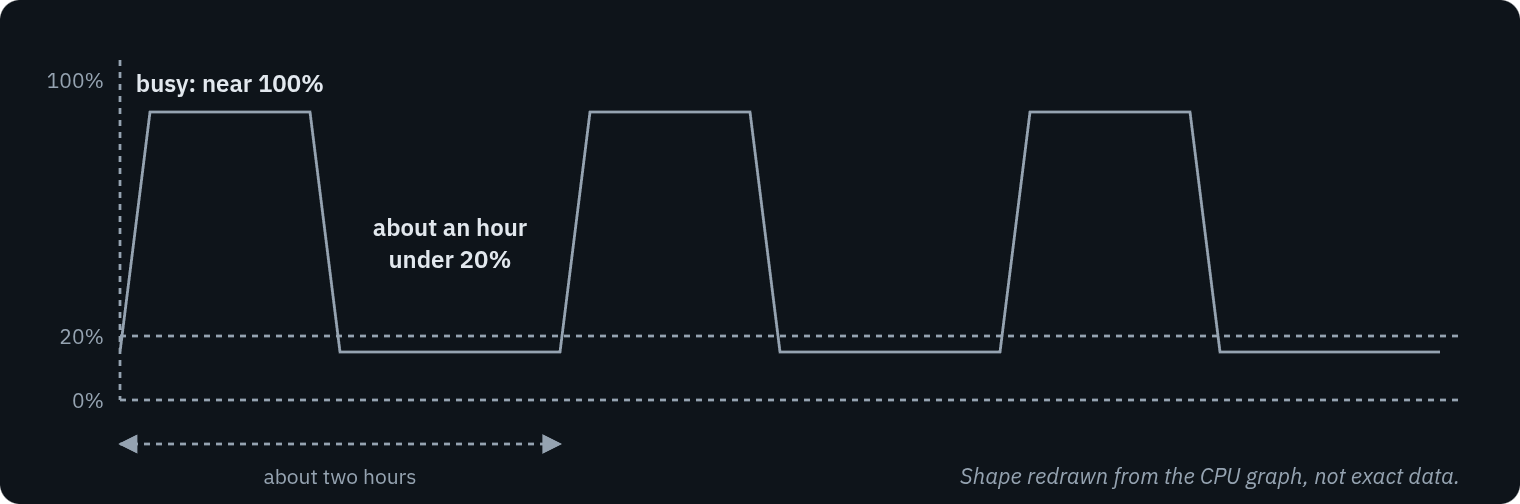
Look at the flat stretches at the bottom. That's the hour I wanted to stop paying for.
Every instance followed the same shape. A busy stretch near 100%, then about an hour under 20%, then busy again, roughly every two hours.
My first idea
So I asked my supervisor. If CPU sits under 20% for an hour between spikes, could dynamic scaling remove instances in those windows and cut the EC2 bill? And was desired = max there mainly to avoid scale-in killing jobs halfway through?
It's a fair question, and I think most engineers would ask it. Target tracking on CPU is the textbook answer for an Auto Scaling group. The graph was clear. Paying for idle instances felt like the kind of waste a review should catch.
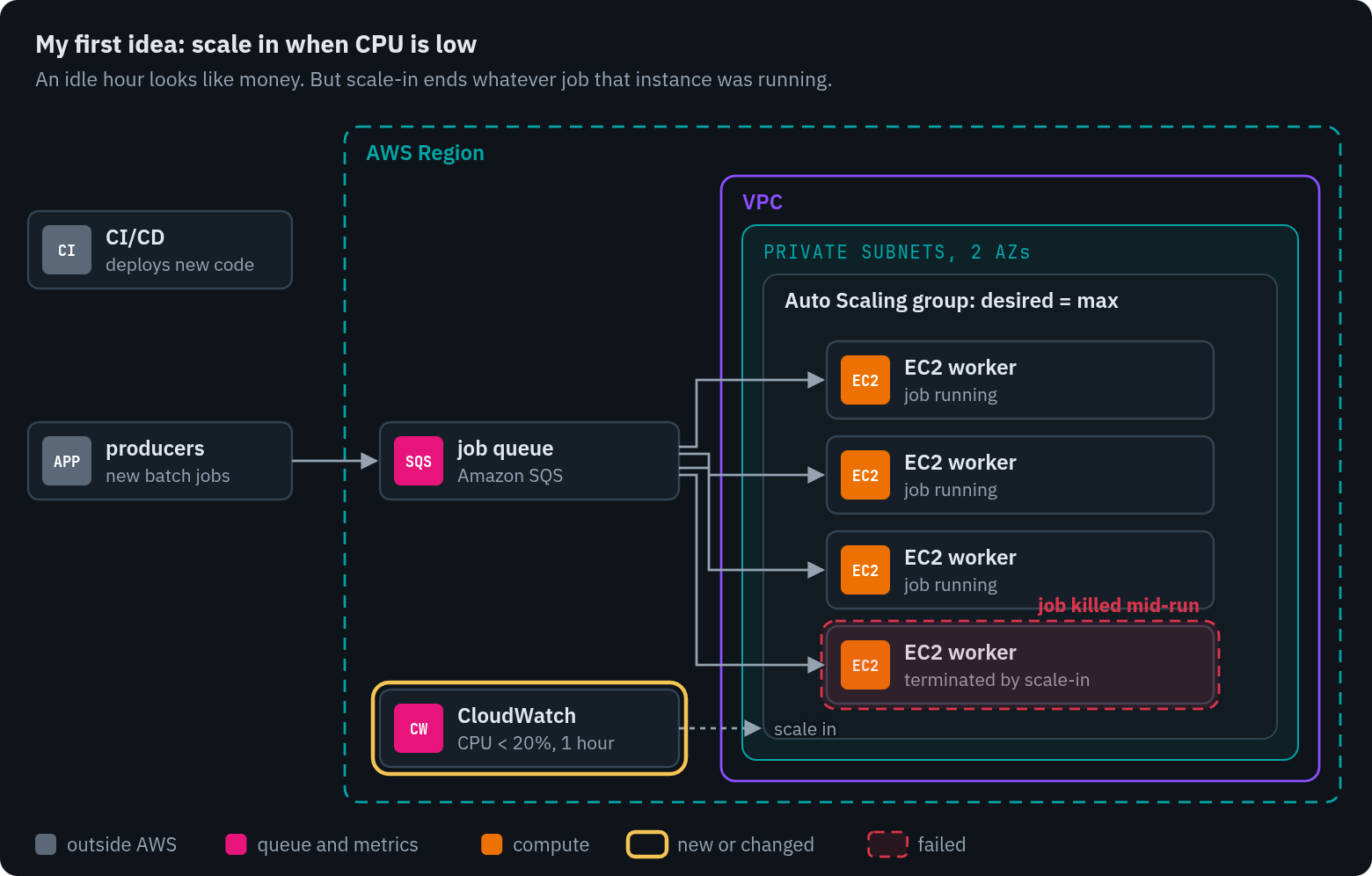
The gold ring is the change I proposed. The red box is what it costs: a scale-in picks an instance, and whatever that instance was running ends.
The answer that moved the problem
My supervisor's answer, lightly edited:
Yes, it is possible. However, our challenge here is not cost, but rather queue stagnation. Rather than reducing the number of EC2 instances when CPU usage is low, it is more important to use the CPU efficiently.
And on desired = max:
That is generally correct. Desired = max is a common pattern to keep performance consistent while preventing excessive instance growth. It still prioritizes refilling instances when their number drops because of failures.
That second part matters. Desired = max doesn't mean "no auto scaling". The group still replaces an instance that fails its health check. It just never shrinks, and it never grows past a number someone chose on purpose.
What did queue stagnation look like? New work kept arriving. The instances were throttled and ran into problems, work was lost, and a backlog built up. A lot of queued work sat clogged instead of finishing. I don't have a queue-depth number from that period, so I won't invent one. The shape was enough: the problem was work waiting, not CPU idling.
Red on the queue, not on a server. That's where the trouble was.
The second failure: deploys
There was another problem, and it doesn't show up on a CPU graph at all.
When the CI/CD pipeline deployed new code, the instances running the old code were replaced. The jobs running on them ended. Those jobs were lost. The team reduced the damage with a special deploy time for the main branch.
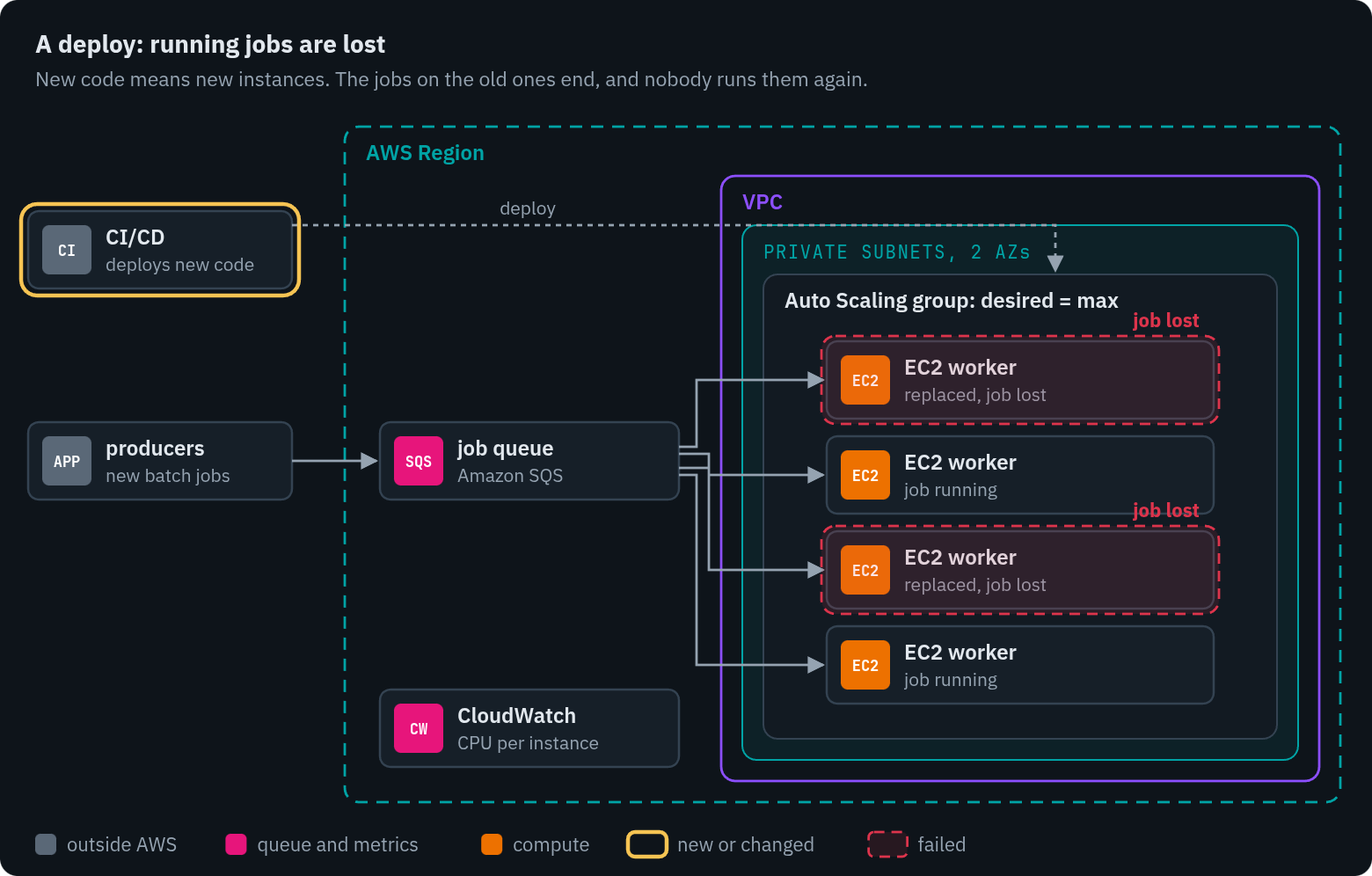
A deploy window lowers the odds. With jobs that run up to 14 hours, it can't bring them to zero.
Couldn't graceful shutdown fix this on EC2? Partly. A termination lifecycle hook can hold an instance before it's terminated. By default it waits one hour. With heartbeats it can wait longer, up to 48 hours or 100 times the heartbeat timeout, whichever is smaller (AWS docs). AWS also says termination hooks are best-effort: if one times out, the instance is terminated anyway. So a 14-hour job means a worker that sends heartbeats for 14 hours and a deploy that waits for the slowest job. That works on paper. In practice it's a lot of fragile machinery to protect a job from a deploy that didn't need to touch it.
So I stopped asking how to shut down gracefully. The better question was why a deploy touches a running job at all.
Three designs, same boxes
I drew the same system three ways. SQS, the producers and CI/CD stay in the same place in each, so you can see that only the compute changes.
1. Today: EC2 in an ASG, desired = max
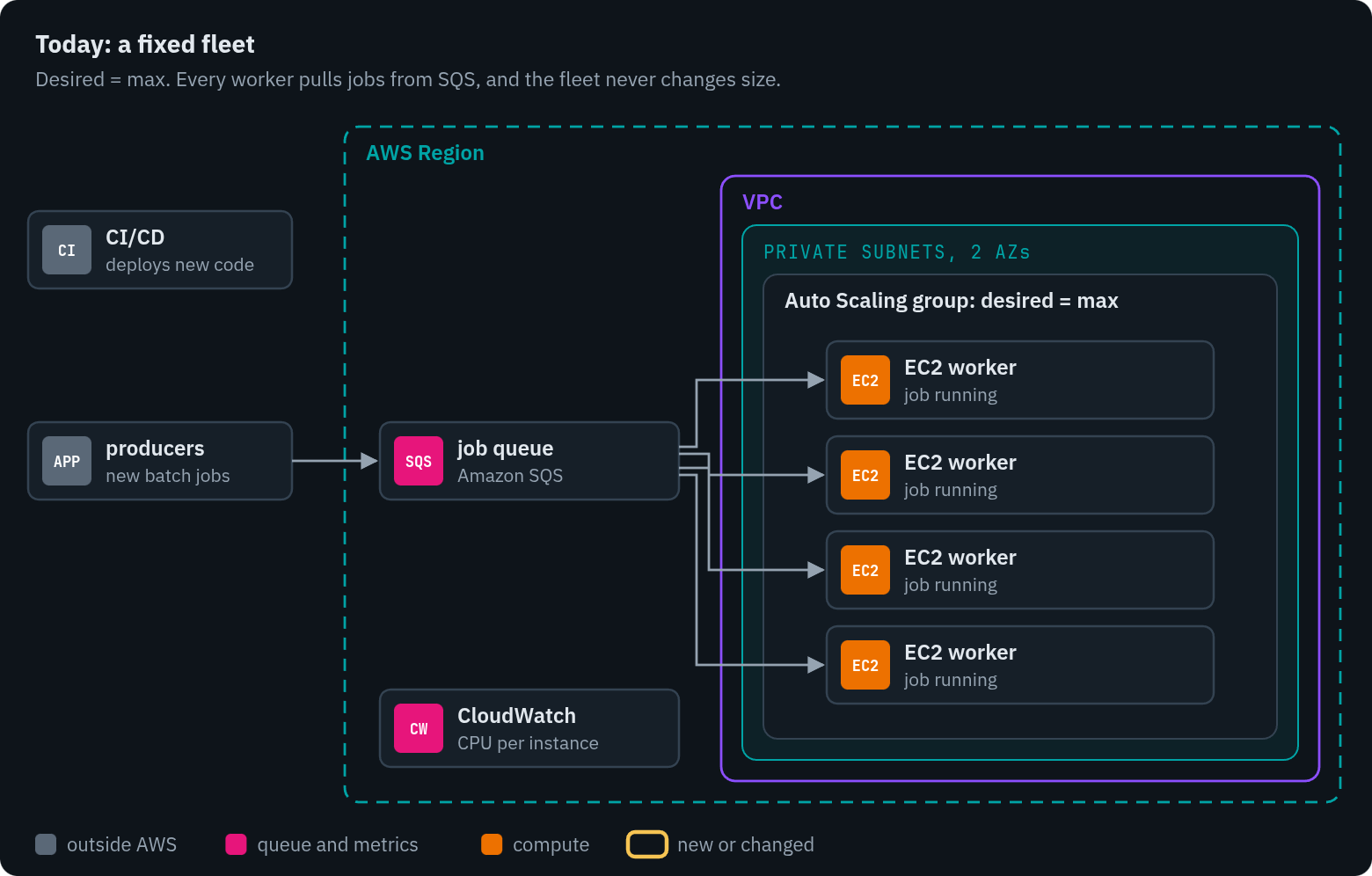
Simple and steady. It never grows to meet a backlog, and a deploy ends running jobs.
2. An ECS service of worker tasks
Same workers, packaged as containers and run as an Amazon ECS service. Service Auto Scaling adds or removes tasks based on the queue's backlog per task, not on CPU. So the fleet grows when work waits.
For deploys, ECS has task scale-in protection. A worker marks its own task as protected when it picks up a job and clears the mark when it finishes. Protection lasts from 1 minute to 2,880 minutes, which is 48 hours, and it covers both scale-in and deployments (AWS docs). During a rolling deploy, new tasks start on the new revision while the old ones finish their jobs.
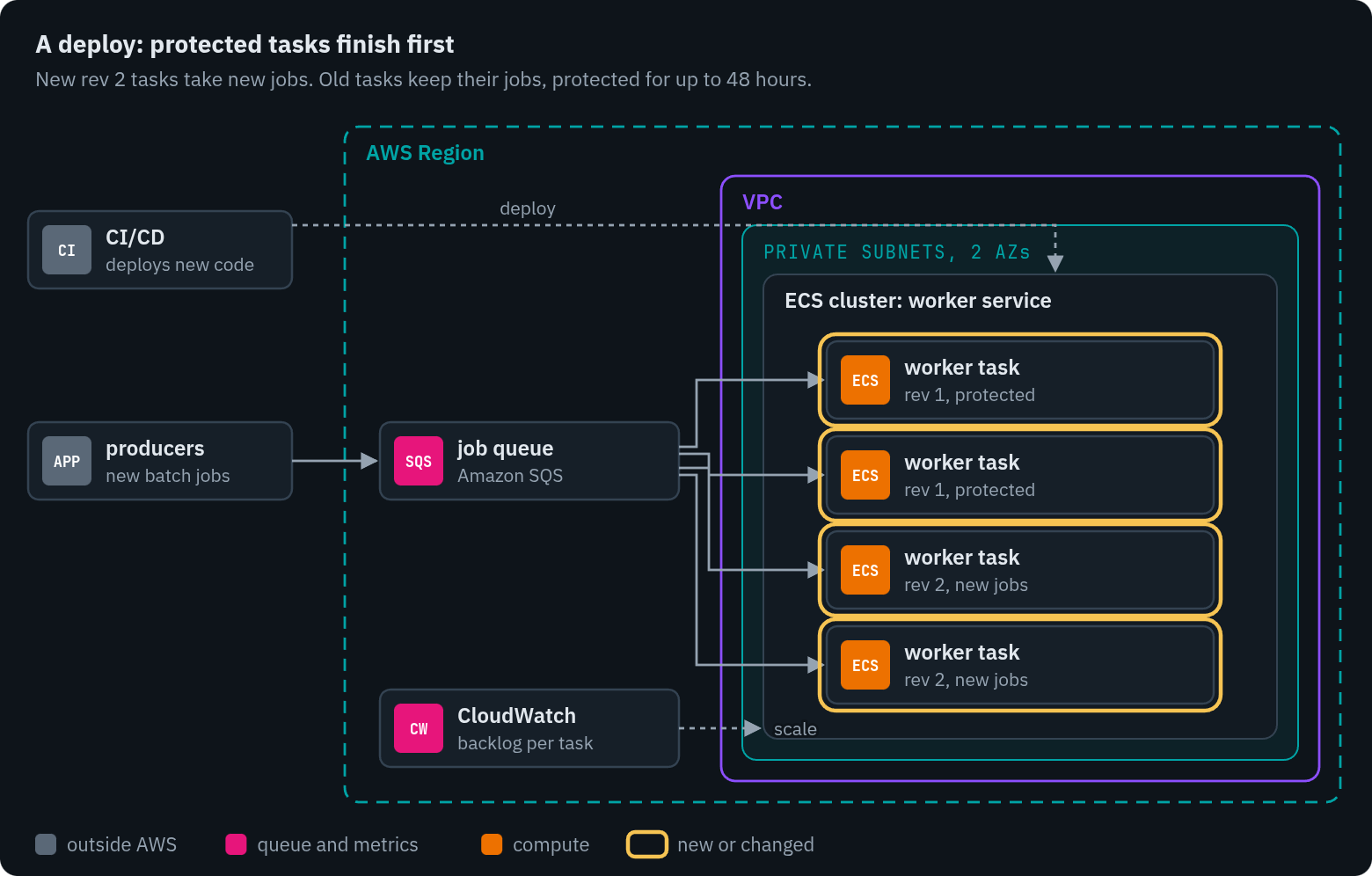
Protection holds a job through a deploy, for at most 48 hours.
There are prices. A deploy now lasts as long as the longest running job. If you deploy with CloudFormation, its stack update times out after 3 hours while protected tasks keep the deploy waiting, and then it rolls back (same page). And there's a quieter problem that hits this design and today's design alike.
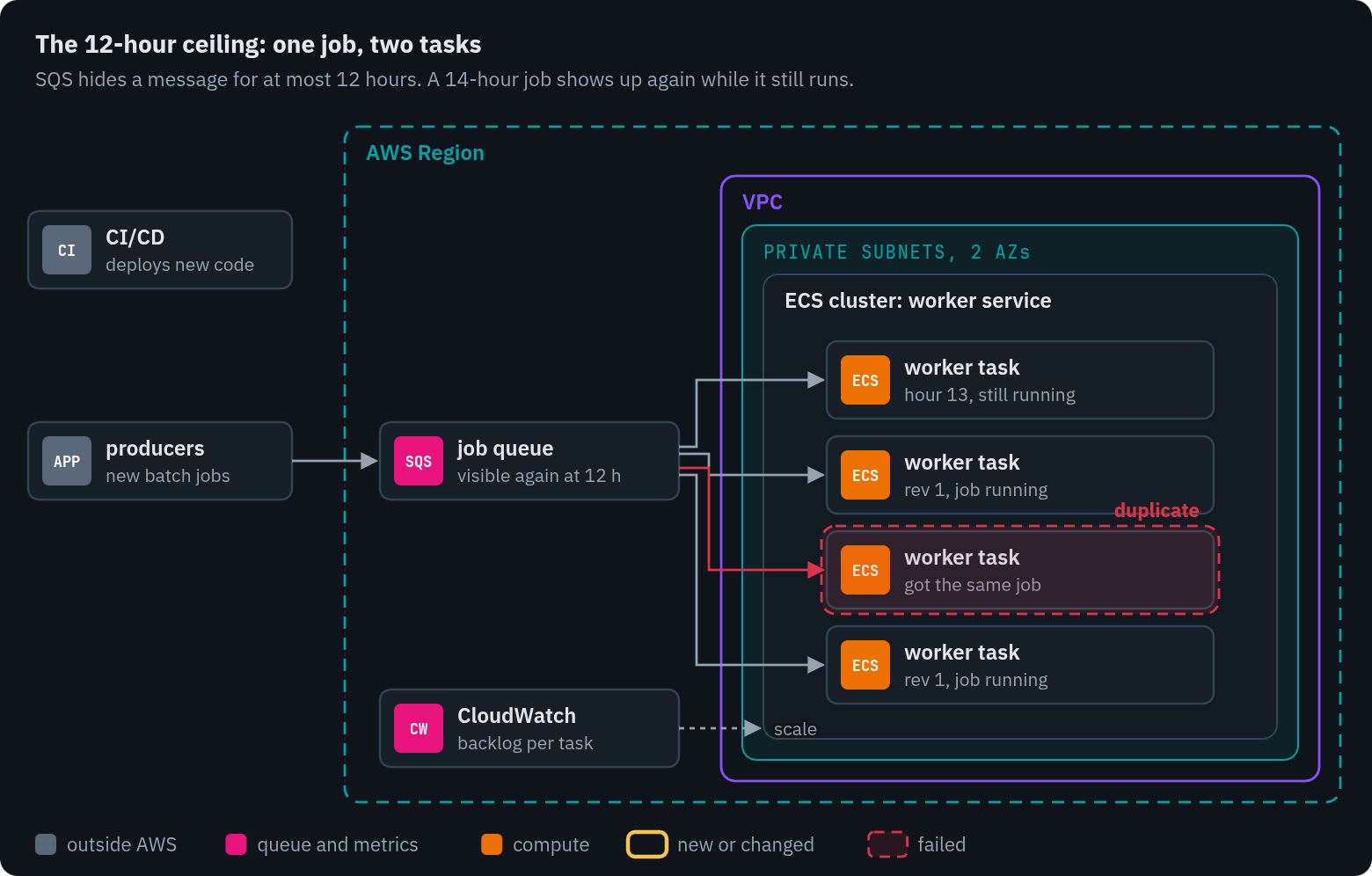
SQS can't hold a 14-hour job.
A worker that pulls from SQS keeps the message hidden while it works, using the visibility timeout. That timeout tops out at 12 hours from when the message was first received, and extending it doesn't reset that limit (AWS docs). So at hour 12 a 14-hour job becomes visible again, and another worker can start it. AWS suggests Step Functions or splitting the work when processing takes longer than that.
3. ECS standalone tasks from a dispatcher
This is the pattern I prefer, and the one I have built. With this EC2 problem in mind, I have designed many architectures around ECS task dispatch since. It hasn't been deployed on this system. I had already containerized this system's batch code, so the step to ECS is smaller than it sounds.
The workers stop being servers. A small dispatcher, a Lambda function that EventBridge runs on a schedule, reads the queue. For each job, or each bundle of small jobs, it does three things: deletes the message from SQS, records the job in a DynamoDB table, and starts an ECS task with RunTask. The task runs the job and exits.
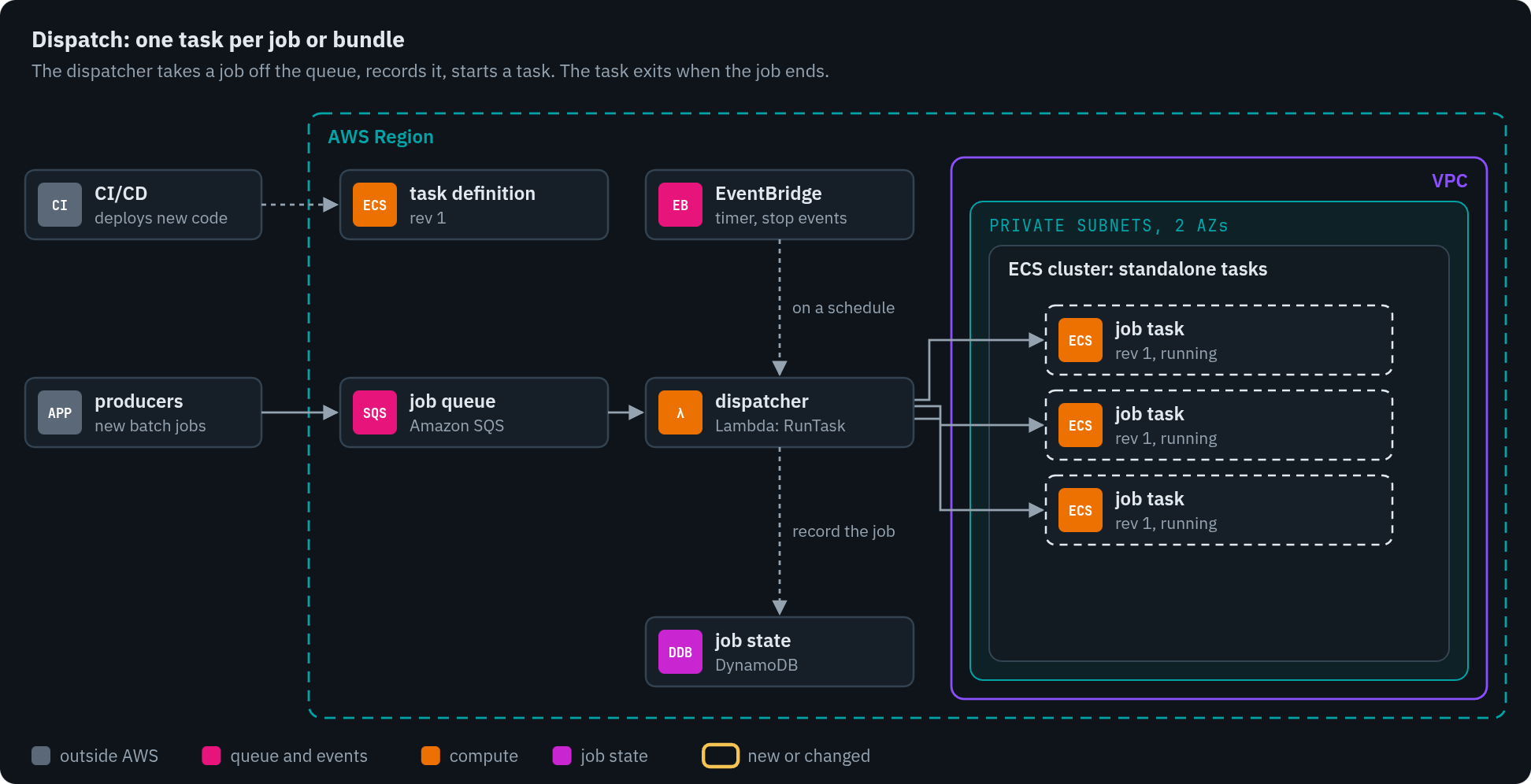
Dashed cards are things that run and then stop. Nothing here waits for work.
Now look at a deploy.
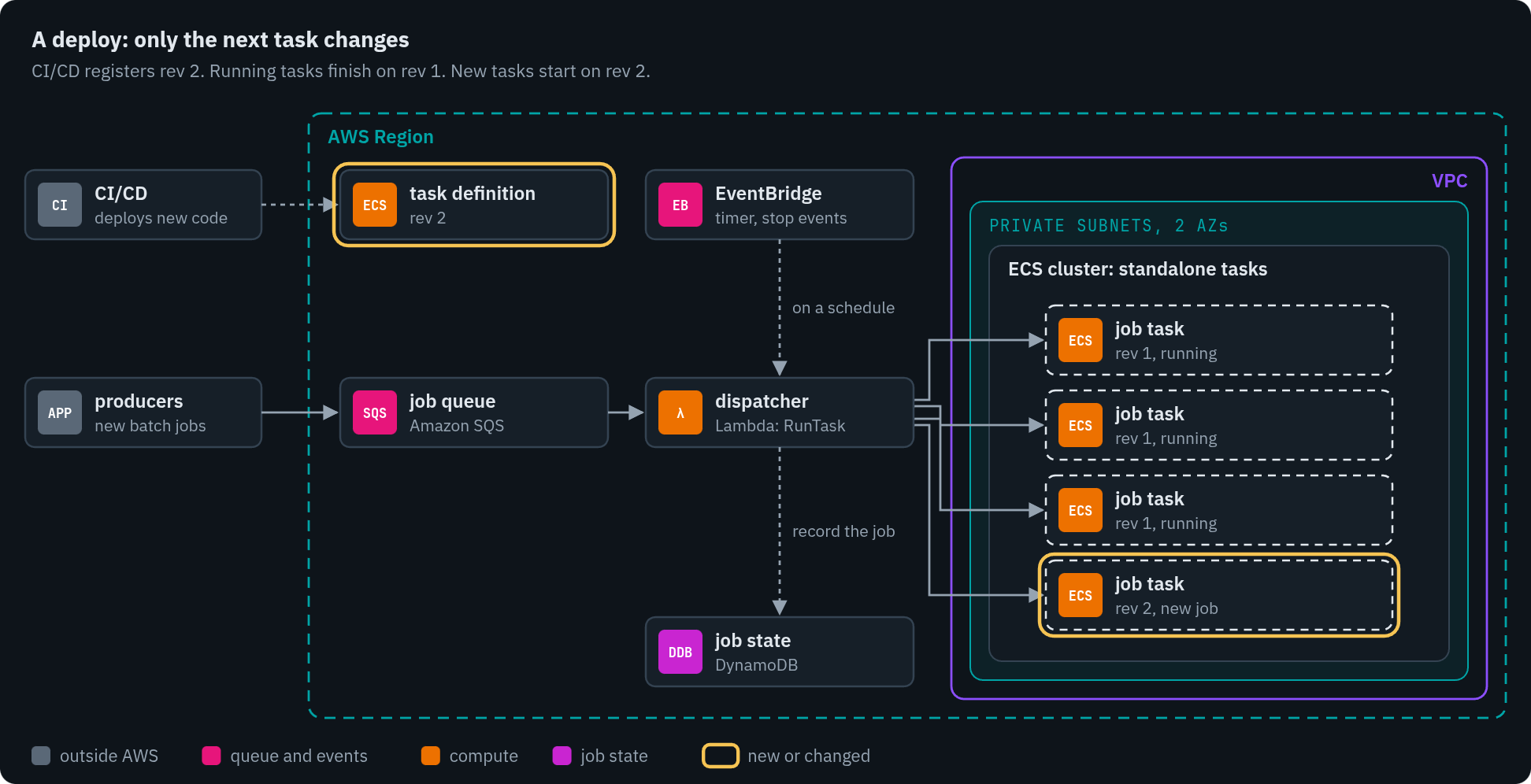
The only things that change are the task definition and the next task.
CI/CD registers a new task definition revision. That's all a deploy does. Running tasks keep the revision they started with until they exit. No graceful shutdown and no deploy window. Scaling follows the work too: the number of tasks is the number of jobs dispatched, within the cluster's capacity.
A task can still stop early. A crash, a host failure, or a Fargate platform update can end one. For standalone tasks, Fargate stops the task on or after its retirement date and doesn't start a replacement. The notice period is 7 days by default, or 14 if you configure it (AWS docs). The AWS Batch guide says Fargate jobs can't expect to run more than 14 days (AWS docs). I've seen ECS tasks retire at around 30 days. Either way, a 14-hour job is far inside the limit. And a stop is handled the obvious way:
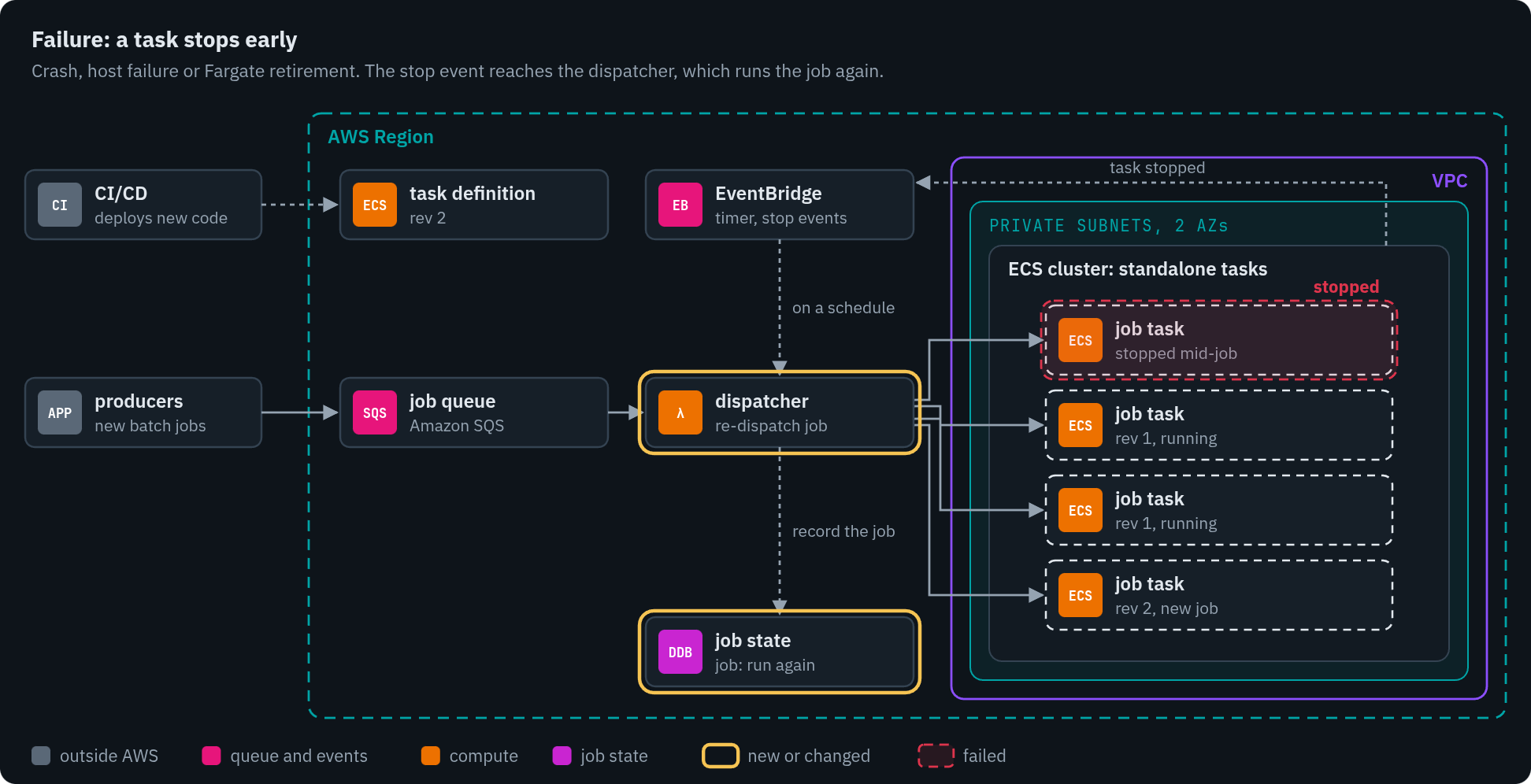
The state table knows which job was on the stopped task, so the dispatcher runs it again.
Since the dispatcher deleted the SQS message at dispatch, the 12-hour ceiling no longer applies. The DynamoDB table holds the job while it runs.
Does the migration fit?
Yes, for deploys killing jobs. For queue stagnation, only if capacity follows the queue. Not as a way to save money; cost was never the problem.
| Design | Deploys kill jobs? | Follows the queue? | What it costs | When I'd pick it |
|---|---|---|---|---|
| EC2 ASG, desired = max | Yes; a deploy window only lowers the odds | No, fixed size | Idle hours paid for, jobs lost on deploy. Simple and steady. | Short jobs, rare deploys, code not yet in containers |
| ECS service with task protection | No, if every job ends within 48 hours | Yes, on backlog per task | A deploy lasts as long as the longest job; CloudFormation gives up after 3 hours; SQS still caps a job's hold at 12 hours | A steady stream of similar jobs, all well under 12 hours |
| ECS standalone tasks from a dispatcher | No, by design | Yes, one task per job or bundle | A dispatcher and a state table to own; retries are yours; start-up time on every task | Bursty load, mixed job sizes, frequent deploys |
For this system, with jobs that run up to 14 hours and deploys that lose work, the third design is the one I'd build. The second is a smaller step if every job finishes well inside 12 hours.
There's also AWS Batch, which does much of the third design as a managed service: job queues, retries and timeouts. I'd compare it before building a dispatcher. Its job queue replaces SQS for this work, so the move is bigger.
Three details decide whether the third design works. Bundle small jobs, because one task per tiny job spends more time starting than working. Respect the quotas: RunTask starts at most 10 tasks per call, and the default Fargate On-Demand quota is 6 vCPUs at a time, which a fleet like this needs raised before going live (AWS quotas). And make every job safe to run twice, because the retry path will run some of them twice.
What I'd tell a junior engineer
If a junior engineer showed me that CPU graph and said "let's scale in and save money", I wouldn't start with scaling. I'd tell them what I'd tell myself back then:
Make the process lean first, so a job doesn't burn more than it needs. Pick the instance type for the workload. If you must scale, choose between vertical and horizontal on purpose. Find the balance between scheduled jobs and dispatched ones. And if you can, build a better queue and dispatch path, because that's where this system's trouble was.
The CPU said the fleet was idle for an hour. The queue said it was behind.
Check yourself
- Your batch fleet's CPU drops under 20% every afternoon. Your queue's oldest message is six hours old. Do you scale in?
- You move long jobs to an ECS service with task scale-in protection. Deploys now take most of a day. Why, and what would you change?
- A job takes 13 hours. Your worker extends the SQS visibility timeout every hour. What happens at hour 12?
Answers
- No. A six-hour-old message means work is waiting, so the fleet is behind, not idle. Scale on queue backlog per worker, not on CPU. Low CPU may mean the jobs are waiting on something else, such as a database or an API.
- A rolling deploy can't stop old tasks until their protection clears or expires, so the deploy waits for the longest running job. Either accept that, or move long jobs to standalone tasks, where a deploy only changes the next task.
- The message becomes visible again. The 12-hour limit counts from the first receive, and extending the timeout doesn't reset it, so another worker can start the same job. Take the message off the queue at dispatch and track the job somewhere else, or split the work into shorter steps.
There's a narrated walkthrough of the three designs, with the diagrams moving: https://youtu.be/MPYkeIaEI90. If you run long jobs on ECS or EC2, I'd like to hear how yours survive a deploy. The discussion is on LinkedIn: https://lnkd.in/p/gGDZMrwP.
Comments
Join the discussionNo comments yet. Be the first to comment.

