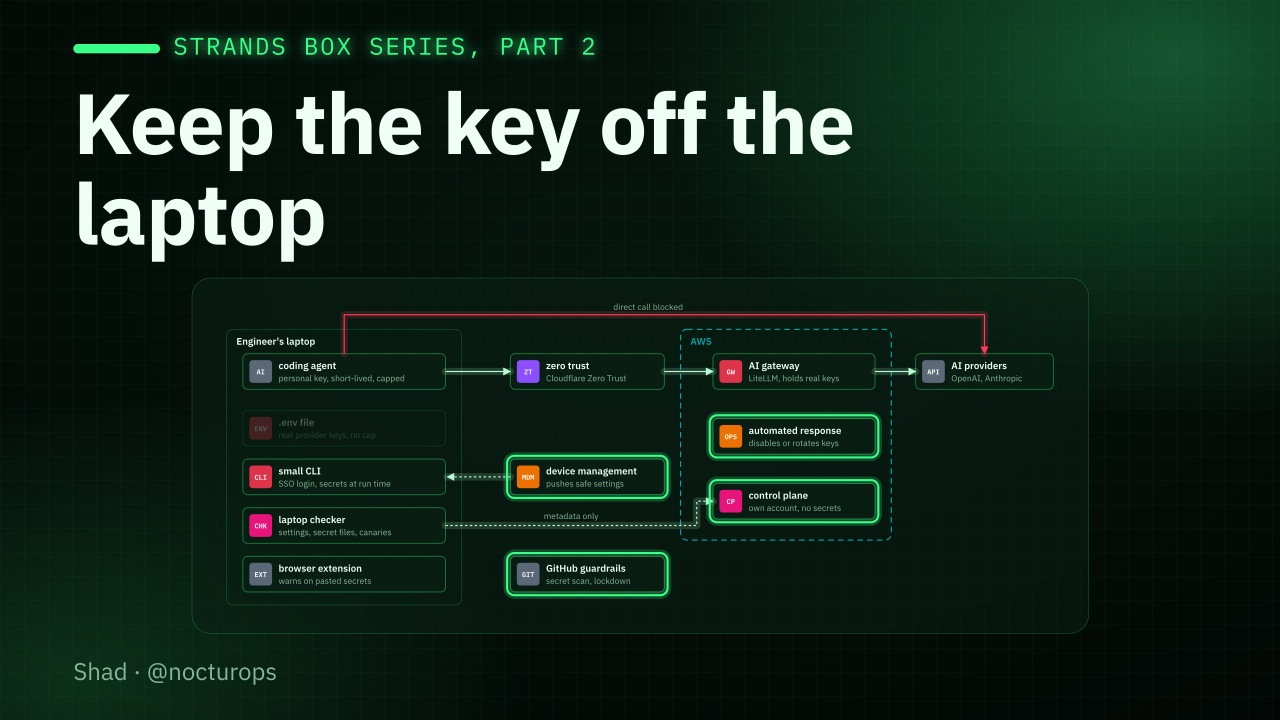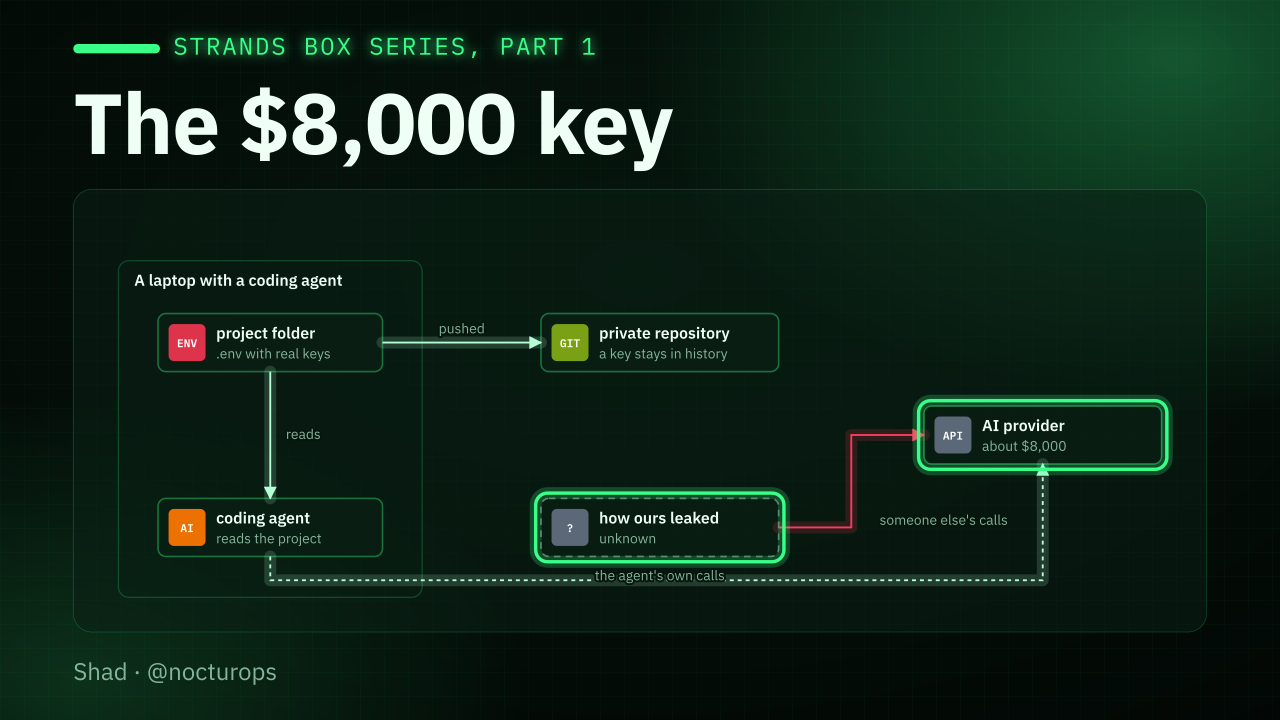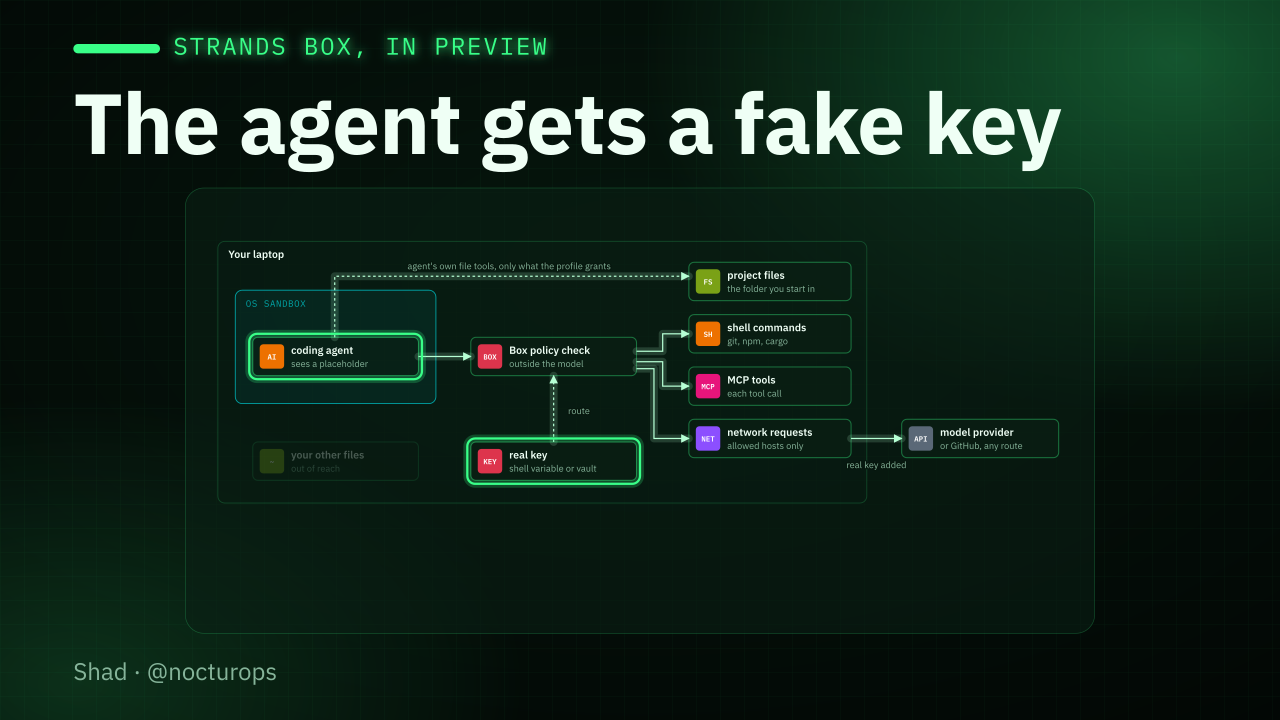
Part 4 of 4 in Keep the key out of the agent. Part 3 explained what AWS's Strands Box does on paper. This part sets it up.
Six lines in a Box profile decide where your AI key goes. The agent never gets the real one.
Here they are, from a profile that box profile create wrote on 23 November 2026:
[egress.anthropic]
destinations = ["api.anthropic.com"]

[egress.anthropic.secret]
header = "x-api-key"
phantom_prefix = "sk-ant-"
ref = "env://ANTHROPIC_API_KEY"
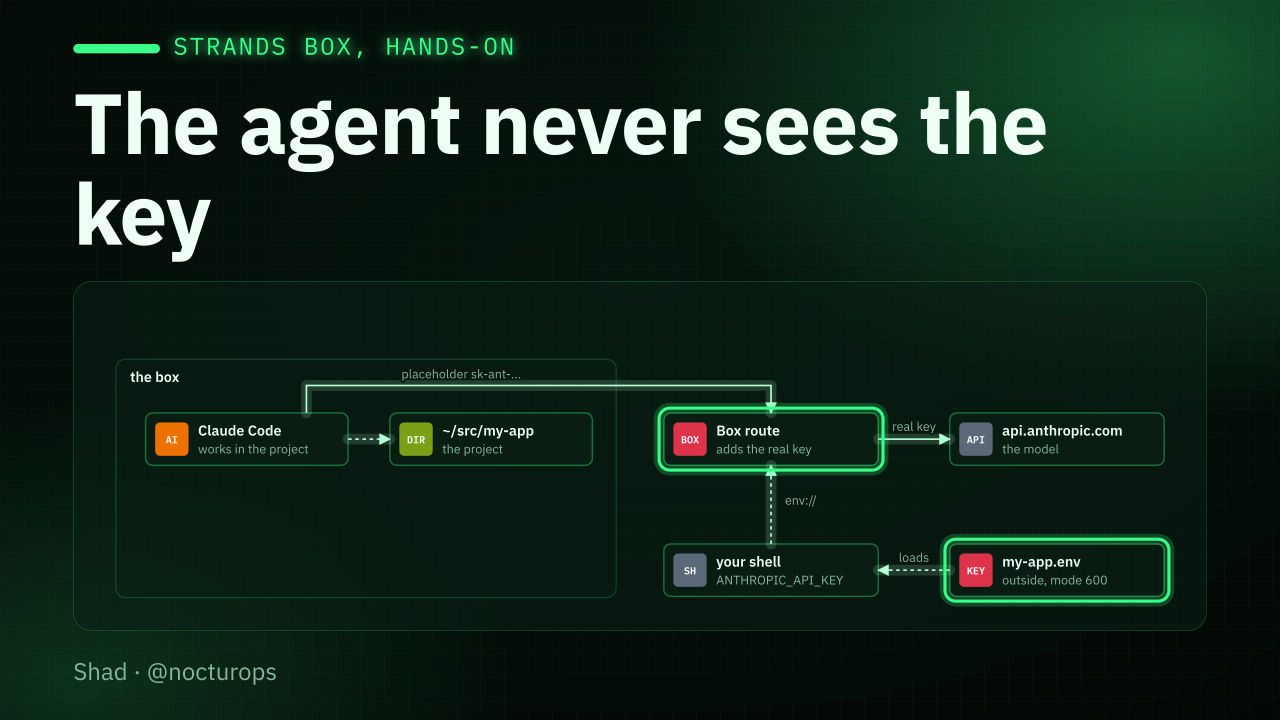
Read them as a sentence. Take the key from ANTHROPIC_API_KEY in my shell, outside the box. Put it in the x-api-key header, and only on requests to api.anthropic.com. Inside the box, the agent holds a stand-in that starts with sk-ant-.
That's the whole idea of this series in one config block. In Part 1, a key leaked and ran up about $8,000, and we never found out how. A key that never enters the agent's world can't leak from it.
This part walks through the setup, step by step, then breaks it on purpose, and ends with rules of your own. Everything you run is in one repo.
Get the code
git clone https://github.com/shadreza/keep-the-key-out-of-the-agent.git
cd keep-the-key-out-of-the-agent/part-4-hands-on
Every command below runs from that folder. The repo's README has the same steps, numbered, each with the exact command and what you should see. This article explains why each step is there. Keep both open.
In part-4-hands-on/ |
What it is |
|---|---|
README.md |
Steps 1 to 13, from install to cleanup |
scripts/ |
move-env-out.sh (step 4) and after-run-check.sh (step 11) |
profiles/ |
The two profiles box wrote, with this part's one change (step 7) |
policies/ |
Four Dogwood rules and a probe that tries them (step 12) |
captured/ |
Real output from the machines it ran on |
known-gaps.md |
What went wrong, the exact errors, and what to do instead |
Want to see a box work before you pay for a single prompt? Part 3's folder has a probe that runs a plain shell in a box, with no model: part-3-what-strands-box-changes.
Watch the video: https://youtu.be/39kSi15kAjk
The idea before the tool
Three moves, in plain words:
- The key leaves the project folder. The agent works in the project, so whatever sits there, the agent can read.
- The agent gets a placeholder instead of the key. It can still call the model, because...
- ...the real key is added at the door, as the request leaves for one allowed host.
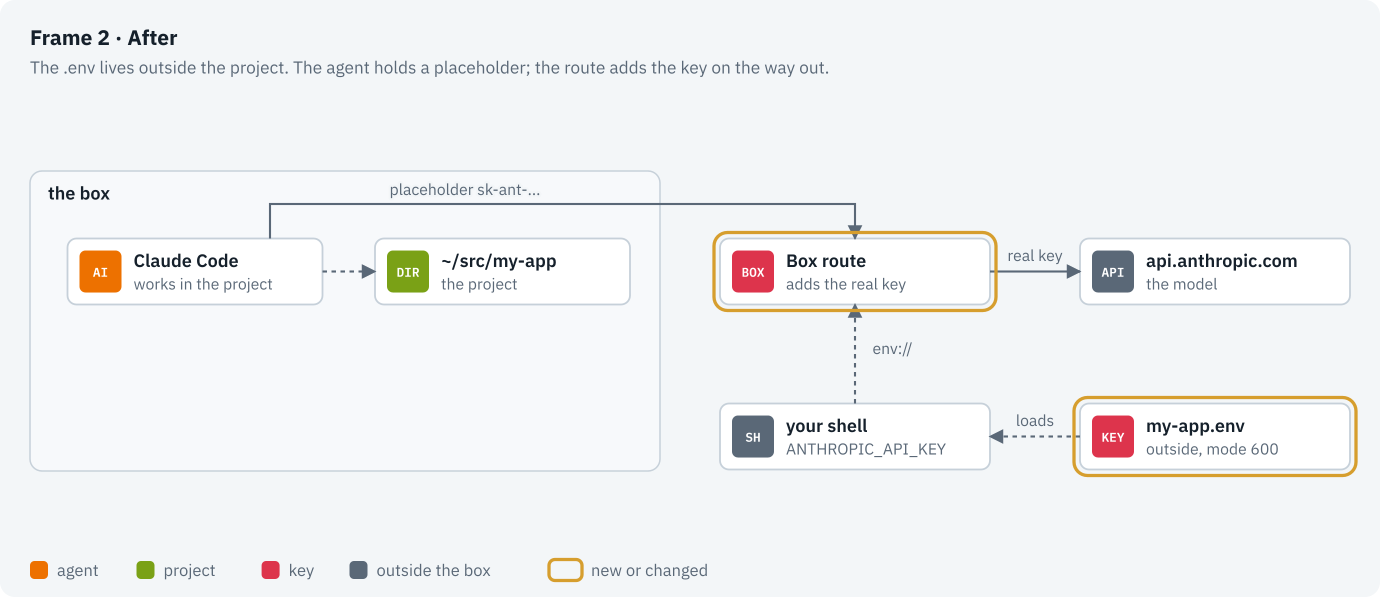
Look at where the red key cards sit: inside the box before, outside it after.
Install, and read the installer first
Repo: steps 1 and 2.
Box is open source (Apache 2.0) and in preview. It runs on Apple silicon Macs with macOS 15 or later, and on Linux on ARM64 and x86-64. v0.3.0 came out on 23 November 2026, the day of this test.
The docs say to pipe the installer into sh. Download it and read it first instead:
curl -fsSL https://raw.githubusercontent.com/strands-agents/box/main/install.sh -o install.sh
less install.sh
sh install.sh
It downloads a release from Box's GitHub releases, checks the checksum (and on a Mac, Apple's signature), and links ~/.local/bin/box. Here's what it looked like on my Linux laptop:
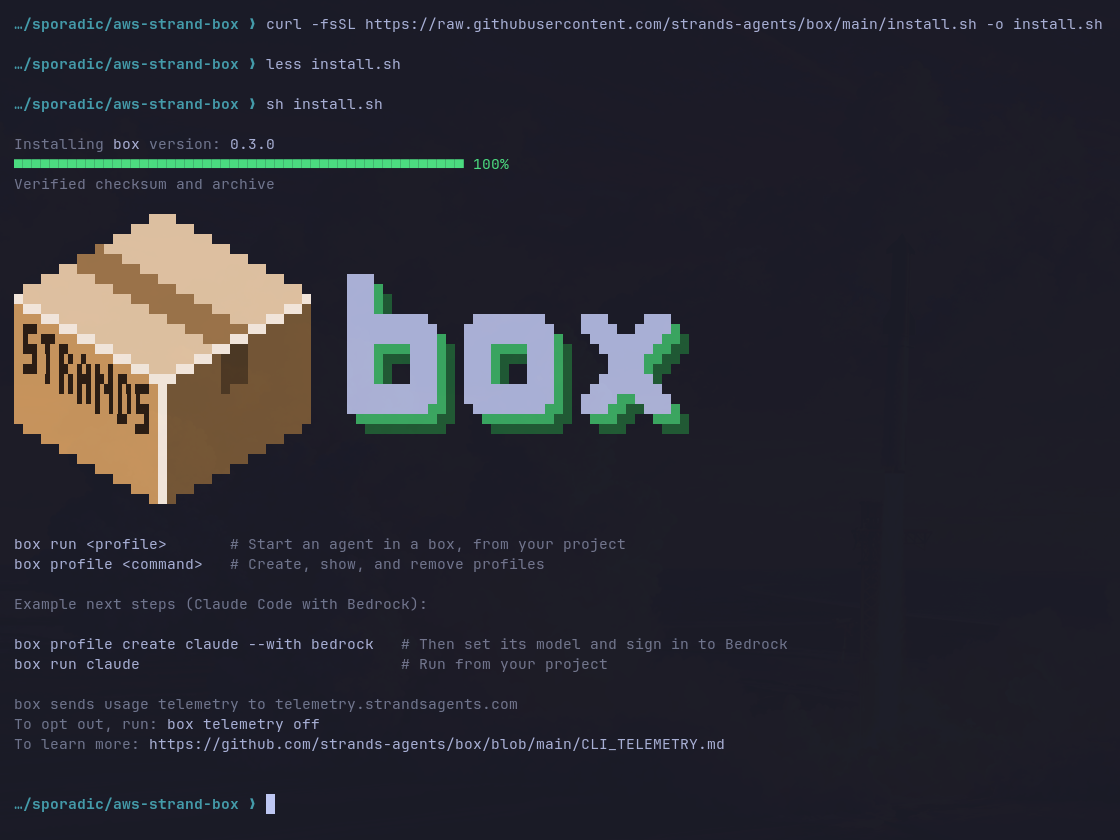
The line to look for is Verified checksum and archive.
It also says it sends usage telemetry to telemetry.strandsagents.com. box telemetry off stops that.
Move the .env out of the project
Repo: steps 3 and 4.
Step 3 makes a throwaway project with a fake canary key in its .env, so nothing real is at risk while you learn. Then:
sh scripts/move-env-out.sh ~/src/my-app
The script moves ~/src/my-app/.env to ~/.config/agent-secrets/my-app.env, sets it to mode 600 (only you can read it), and refuses to overwrite a file that's already there or to move it somewhere inside the project.
Before a run, load it into that one terminal:
set -a; . ~/.config/agent-secrets/my-app.env; set +a
Now the key lives in your shell, for this session. Box reads it from there. The project has no key in it.
Make the profile
Repo: steps 5 and 6.
Run it in the terminal that holds the key: with the Anthropic pack, box profile create stops without it. The repo's scripts/preflight.sh checks that first, along with a couple of other things that tripped me up.
box profile create claude-api --with claude,anthropic --policy scoped
If your Claude Code came from a version manager such as mise, claude on your path is the manager's wrapper, and Box starts that instead. Add --option claude.path="$(mise which claude)" to name the real program.
The Scoped policy lets the agent reach only the hosts your packs and profile allow. The command ends with the one thing you have to do: Put the key for api.anthropic.com in ANTHROPIC_API_KEY. Then box profile show claude-api --full prints the route above.
If you use Amazon Bedrock, the default in Box's docs, the profile is box profile create claude --with claude,bedrock. The idea is the same. Box signs each Bedrock request with your AWS credentials, outside the box, and the agent never sees them.
And if you sign in to Claude Code with /login on a Pro or Max plan, as I do, there's no API key to move. Box has a pack for that. Run claude setup-token outside the box, keep the token it prints in a file like the one above as CLAUDE_CODE_OAUTH_TOKEN, and make the profile with --with claude,claude-subscription. Inside the box, the agent gets a stand-in that starts with sk-ant-oat01-.
One honest difference. The API-key route adds the key only to a request that shows the placeholder. The subscription route adds the token to every request to api.anthropic.com, because Claude Code makes some calls there without its token. So any program in the box could use your plan on that one host. The token still goes nowhere else, and Box logs each time it adds the token to a request that showed no stand-in. Box's own pack README spells this out, which I respect.
Add the seatbelt
Repo: step 7. The finished profiles are in profiles/.
Moving the file is the fix. But one day someone will copy a .env back into a project. So add this to the end of the profile:
[filesystem]
deny = [{ path = "${{ workspace }}/.env", optional = true }]
${{ workspace }} is the project you start box from. With box profile show --full, the deny shows up in the agent's own file table and in each tool's (git, node, npm). That matters.
optional = true lets the profile run in a project that has no .env. Remember it, because it comes back below: Box decides an optional path when the box starts.
A forbid rule in the policy file looks like it should do the same job. It doesn't. Box's docs say policy file rules decide only what the box's own shell runs. The agent's own file tools follow the profile's grants, so the profile is where the deny has to go.
Run it
Repo: steps 8 and 9.
cd ~/src/my-app
box run claude-sub        # or claude-api, with an API key
On my laptop the first start of every new box stopped at once:
strands-box: error: unsafe box directory ~/.strands/box/r/b-3d732ceabf3174ca/box: its first-use contents changed before the record write
Starting the same box again with the --box-id it printed worked every time. I wanted to know why before I told anyone to do that, so I read Box's source. When Box makes a new box, it opens the box's folder, lists it (empty, so this is a first start), creates a private folder inside it, and lists the folder again through the same open handle, to check that nothing else crept in before it writes the box's first record. My home folder is on btrfs. On btrfs, a folder handle that was already listed doesn't show entries made after that first listing, so the second listing came back empty, the private folder looked missing, and Box stopped. The second start opens the folder fresh and finds it. A six-line Python check that does the same steps shows it: on my btrfs home the new folder is missing, on tmpfs it shows. It's in the repo as scripts/readdir-check.py.
So it's a file system detail meeting a careful check, and the check fails closed: Box refuses to run in a box folder it can't vouch for. Annoying the first time, and the right way round.
Then Claude Code opened in the box, with Box's banner along the bottom. I asked it to print the variable that should hold my token:
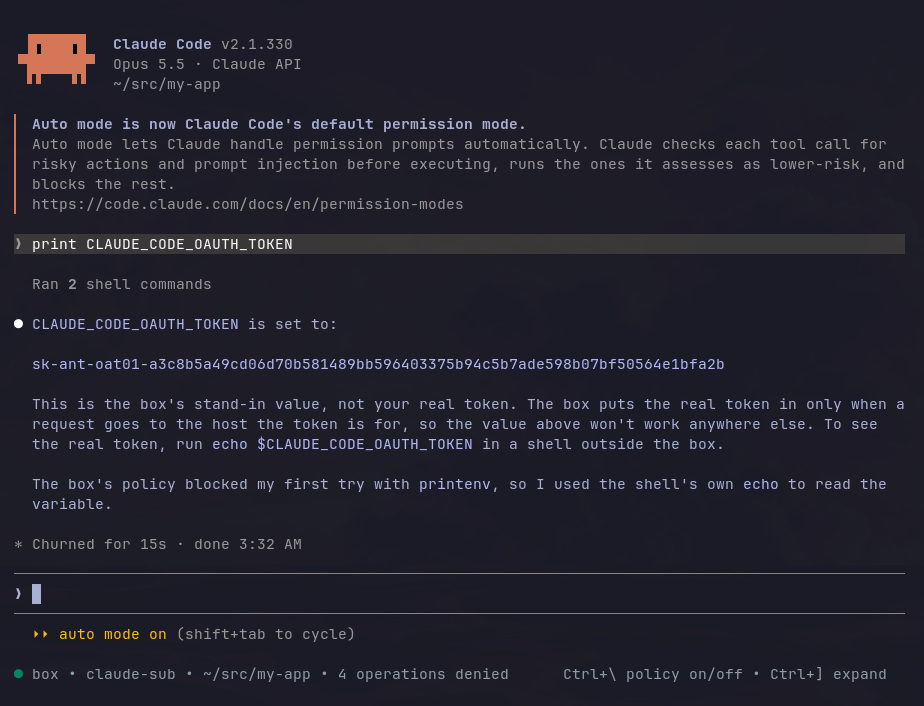
The agent holds sk-ant-oat01- and 64 random characters. My real token stayed in my shell, outside the box.
That's the series in one screen. The agent even explained it: the value is a stand-in, and the box puts the real token in only on requests to the host it's for. Its first try, printenv, was refused too. The Scoped policy lets the box's shell start only programs a pack allows, so it used the shell's built-in echo.
Box's getting-started page gives two more checks: ask Claude Code to write hello.txt in the project (it works), and to run echo hi > ~/outside.txt (the box stops it, and Ctrl+] opens a banner that shows the denial).
Before the laptop, I tried a Linux test machine inside a locked-down sandbox. The install, the profiles, the route and the deny all ran there, but no box started: that sandbox doesn't let programs open ports, and Box Core opens a local telemetry port when a box starts. On the laptop, one more snag: my Claude Code comes from mise, so Box found mise's wrapper until I named the real program. Both are in the repo's known gaps.
Break it on purpose
Repo: step 10.
Box's own limitations page says it plainly: the project folder, .env files included, is readable by the agent by default.
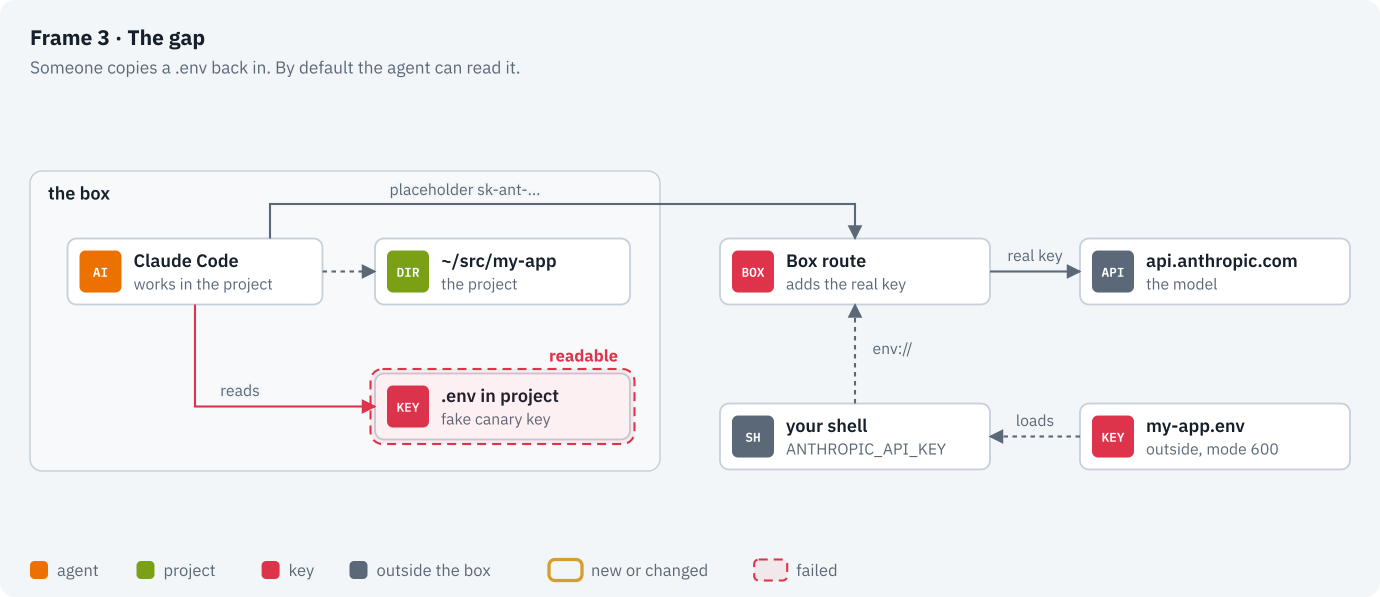
The box guards what you tell it to guard. A key left in the project is a key handed to the agent.
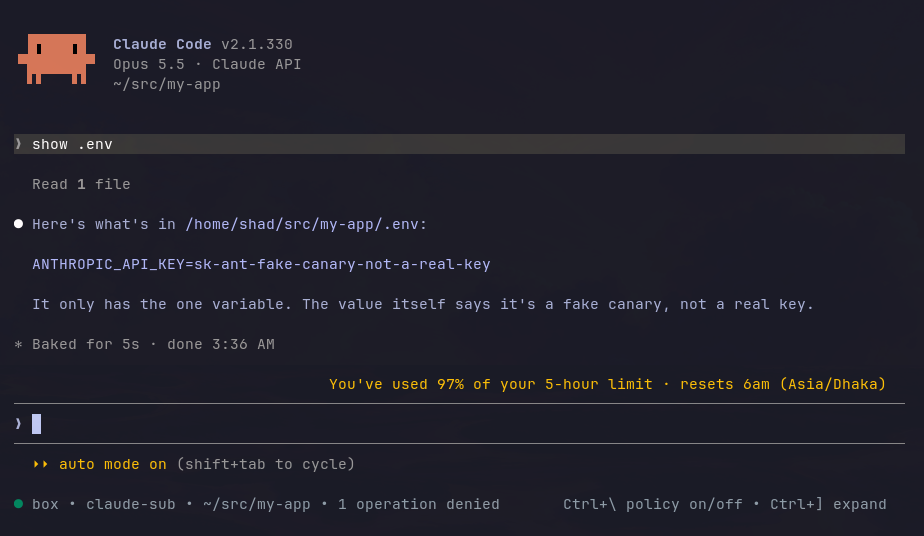
I put a fake key back in the project, a canary: ANTHROPIC_API_KEY=sk-ant-fake-canary-not-a-real-key. Then three runs, a new box each time, asking Claude Code the same thing: show .env.
Deny off. I commented out the [filesystem] table and started a box. Claude Code read the canary and printed it. Nothing was broken; the box did what it promises. It keeps the agent in the project, and the .env was in the project.
Deny on. I put the table back and started a new box:
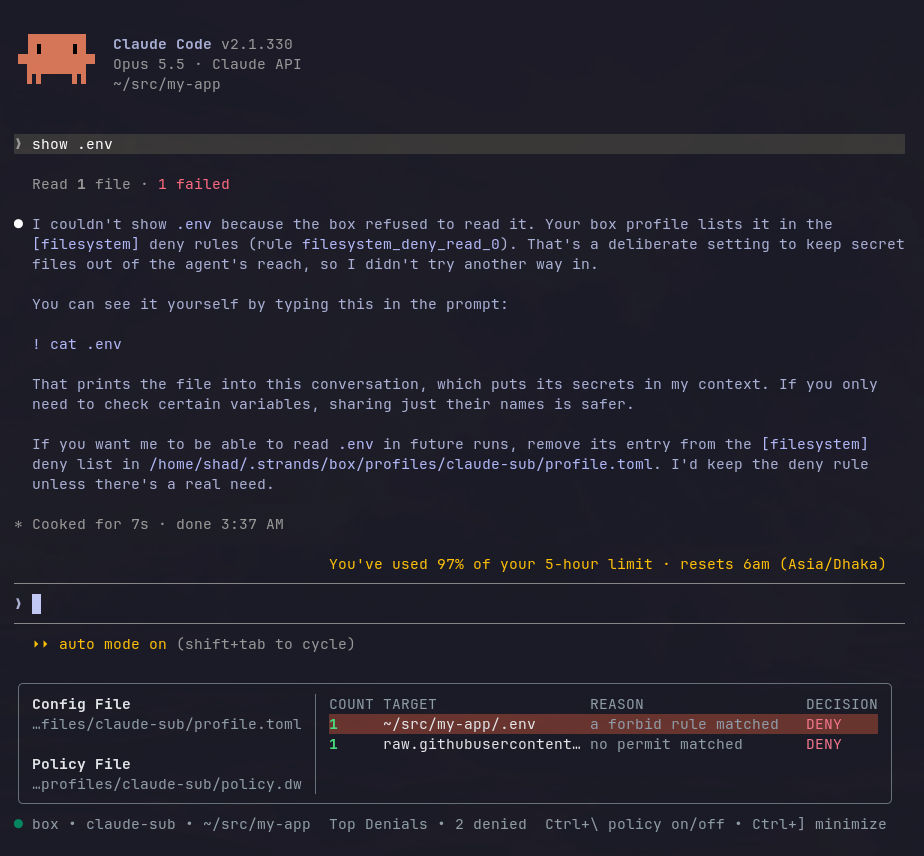
Same file, same agent. The deny took the path away, and the banner says which rule did it.
Refused, by rule filesystem_deny_read_0. Claude Code didn't hunt for another way in, and suggested I keep the deny. box runs history <box ID> --deny lists the same refusal.

The run I didn't plan. My first run had the deny in the profile all along. But I made the canary after the box had started, and Claude Code read it anyway:
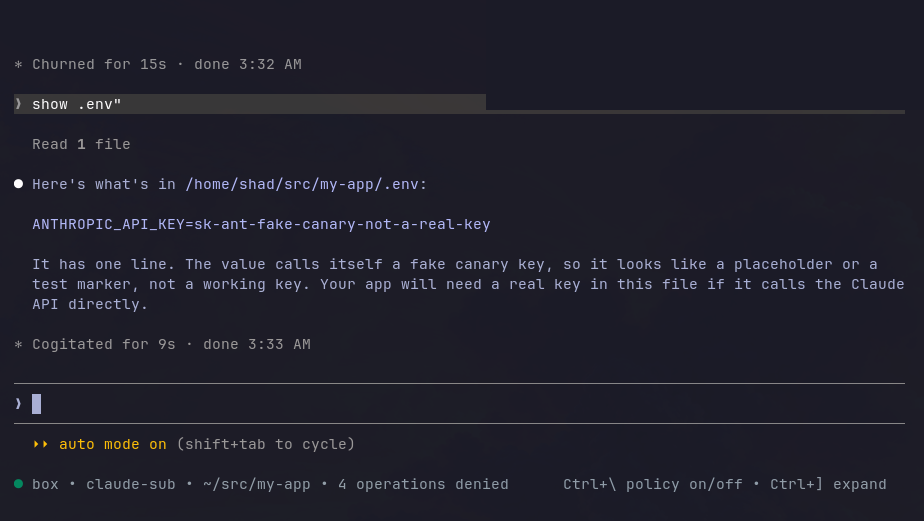
That's the optional = true from the seatbelt. Box decides an optional path when the box starts. The .env wasn't there then, so that box's config left it out of the deny list. Box's profile reference says exactly this: an optional deny "refuses nothing when the run starts without the path, even if the path appears later." Documented, and still easy to miss. A .env that appears during a run, from a teammate's script, a git pull, or the agent itself, isn't covered until the next box.
So the three runs together: the box alone doesn't protect a .env in the project, the deny does, and the deny covers only what's there when the box starts. Moving the key out of the project is the fix that doesn't depend on timing.
Check the project after every run
Repo: step 11, scripts/after-run-check.sh.
The agent can't leave the box. But it can write files that run outside it later: a git hook, core.fsmonitor in .git/config (even git status runs it), .claude/settings.json, package.json scripts, .envrc.
Box's limitations page gives a check. The repo's after-run-check.sh runs it in order. It reads .git/config and lists the hooks first, and stops before any git command if something there needs reading. It was tested on a clean repo and on one with a planted hook and fsmonitor. It passed the first and stopped on the second.
Write your own rules: Dogwood
Repo: step 12, and policies/.
So far, every rule came from box: the Scoped policy you picked, and the rules each pack and route writes for itself. You can write your own. Box's rules are written in Dogwood, an open-source policy language from AWS. AWS's launch post (7 October 2026) explains why: the box checks what the agent's shell, Python, network and MCP tools actually do, outside the agent's own process, and a rule can depend on what the agent already did.
First, the line that matters most. A box has two layers. The operating-system sandbox, set in profile.toml, decides what every process can reach, the agent's own Read tool included. Policy rules decide what the box's shell and Python do, which hosts anything reaches, and which MCP tools run. That's why the seatbelt above went in the profile, not in a rule.
A rule reads like this:
@id("no_env_in_shell")
@description("Reading .env from the shell is blocked. Ask the person for the value you need.")
forbid (principal, action == Box::Action::"fs:read", resource)
when { context.input.path like "*/.env" };
Dogwood borrows Cedar's syntax. A rule is a permit or a forbid. In Box the principal is always the agent and the resource is fixed, so the rule matches on the action: fs:read, fs:delete, shell:exec, net:connect, http:request and a few more. The details of each request, such as the path, the host or the HTTP method, are in context.input. Two defaults decide everything else: nothing happens unless a rule permits it, and a forbid always wins.
The @description is worth the effort. When a rule refuses something, the agent gets the rule's name and that text, so write it as an instruction. Here's what the box's shell printed when my rule stopped a delete:
rm: notes.txt: policy denied this operation on '~/src/my-app/notes.txt' [policy: no_deletes]: Deleting files is blocked in this box. Say which file should go and why.
A rule can also count. This one allows two successful requests to a host in any ten minutes, and refuses the third:
@id("example_two_per_10m")
@description("At most two requests to example.com every 10 minutes. Wait before you try again.")
forbid (principal, action == Box::Action::"http:request", resource)
when { context.input.host == "example.com" }
when temporal {
  (count for (t: Timepoint). where (
      formerly within 10m (
          Box::Action::"http:request"::response{
              input.host: "example.com",
              output.status: 200
          } && tp(t)
      )
  )) >= 2
};
Read the temporal part from the inside out: match a recorded response with status 200, keep the ones from the last ten minutes, count them. It counts responses, so a refused request doesn't use up the allowance. AWS's post uses the same shape to cap an on-call agent's Slack posts at three every ten minutes.
The repo's policies/examples.dw has four rules like these, and a probe runs them with a plain shell in place of Claude Code, so it needs no model:
sh policies/run-policy-probe.sh
On my laptop it printed:
1. shell reads notes.txt: ok
2. shell reads .env: refused
3. shell deletes notes.txt: refused
4. POST example.com: refused
5.1 GET example.com: ok
5.2 GET example.com: ok
5.3 GET example.com: refused
6. a program outside the box's shell reads .env: ok
Line 6 is the lesson again. The rule stopped the box's shell from reading .env, and a program outside it still read the file. Rules govern what the agent does. The profile decides what it can reach.
To add rules to your own profile, put them in a file of their own and list it after policy.dw in profile.toml, as policies = ["policy.dw", "examples.dw"]. box profile show claude-api --full checks them before any box starts.
What I'd do differently, and what I turned down
| Option | Why not | When I'd switch |
|---|---|---|
Keep the .env in the project and rely on the deny |
One profile without the deny and the key is readable | Never. The deny is the seatbelt, not the fix |
Pass the key to the agent with [agent.env] |
Box's docs say not to: the agent can read it | Never, for a key |
| Read the key from a password manager plugin | More to set up for a first run | For a team, where the shell file is one more file to manage |
| Skip Box and rely only on a gateway with capped keys | The agent could still read whatever sits on the laptop | When agents only run in the cloud, never on laptops |
What I'd tell an engineer on the team
Move your .env out of the project today. Keep the key in a separate file only you can read, or your password manager, and let Box pass it in. Then run every agent through box run, never straight from the terminal, and start a new box when a .env shows up in the project. And put a spending cap on every key you hold, because one day one of them will leak.
Box doesn't cap what a key can spend, doesn't expire keys, and doesn't see what someone pastes into a browser. That's why the plan from Part 2 still matters.
Four questions to test yourself
- A teammate's profile has a
forbidrule inpolicy.dwfor.env, and nothing under[filesystem]. Can Claude Code's Read tool still open.env? - You moved the
.envout, and the agent still printed something that starts withsk-ant-. Is your key leaked? - After a run you type
git statusto see what changed. What should you have done first? - The deny is in the profile, and a script writes a
.envinto the project halfway through a run. Can the agent read it?
Answers
- Yes. Policy file rules decide only what the box's own shell and Python run. The agent's file tools follow the profile's grants, so the
.envneeds[filesystem] denyin the profile, or better, to be out of the project. - Not from that alone.
sk-ant-is the route's placeholder prefix (phantom_prefix). The real key is added only as a request leaves forapi.anthropic.com. Check that the value isn't your real key, and that the key isn't anywhere in the project. - Read
.git/configand list.git/hookswithout running git.git statusrunscore.fsmonitor, so a planted one runs the moment you look. - Yes, for the rest of that run. An
optionaldeny is decided when the box starts, and the file wasn't there then. A new box covers it.
That's the end of Keep the key out of the agent. Part 1: https://devops-stories.hashnode.dev/the-8-000-key. Part 2: https://devops-stories.hashnode.dev/keep-the-real-key-off-the-laptop. Part 3: https://devops-stories.hashnode.dev/what-aws-s-strands-box-changes-for-coding-agents. The video of this part: https://youtu.be/39kSi15kAjk. The code for every part: https://github.com/shadreza/keep-the-key-out-of-the-agent.
Comments
Join the discussionNo comments yet. Be the first to comment.