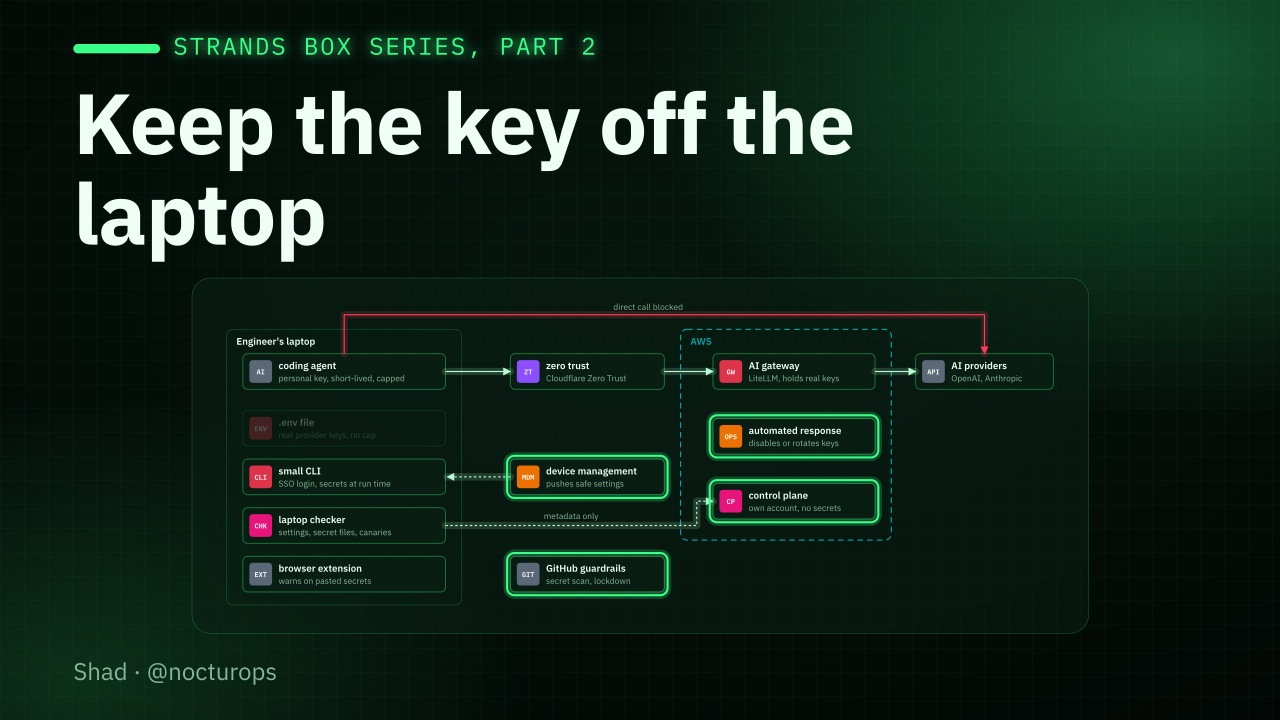
Part 3 of 4 in Keep the key out of the agent. Part 2 ended on a gap in my plan: the gateway kept the real keys on servers, but the coding agent itself still ran with whatever the laptop could reach.
AWS's open-source Strands Box hands the agent a fake key. The real one gets added on the way out.
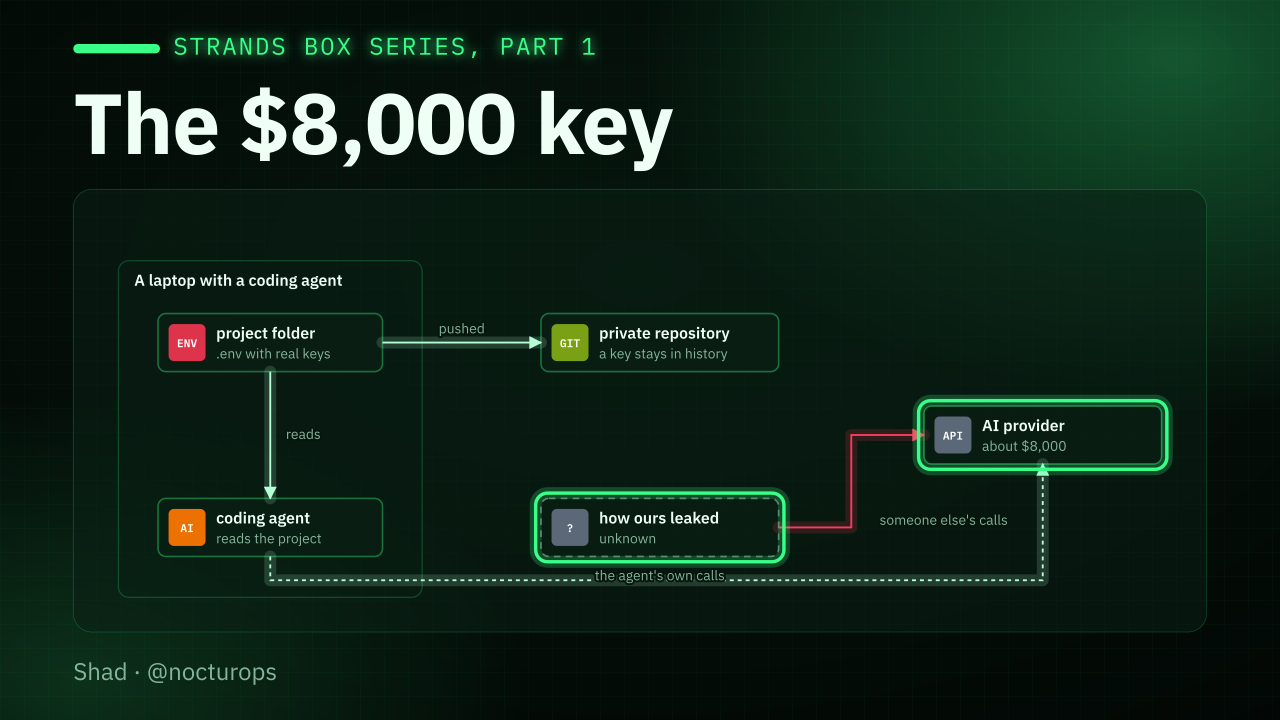
That sentence is the reason this part exists. In Part 1, a leaked AI key ran up about $8,000 on a project's bill, and we still don't know how it leaked. In Part 2, I wrote an eleven-part plan to keep real keys off laptops. Then Strands Box came out, and it goes after the one place my plan only watched: the agent.
This part doesn't run it. Part 4 does that, on a real laptop. This part reads what the project says Box does, and holds it against the plan. Where its own docs say "this is not protected", I say so too.
First, a question
Before picking a sandbox, ask what the agent can touch today.
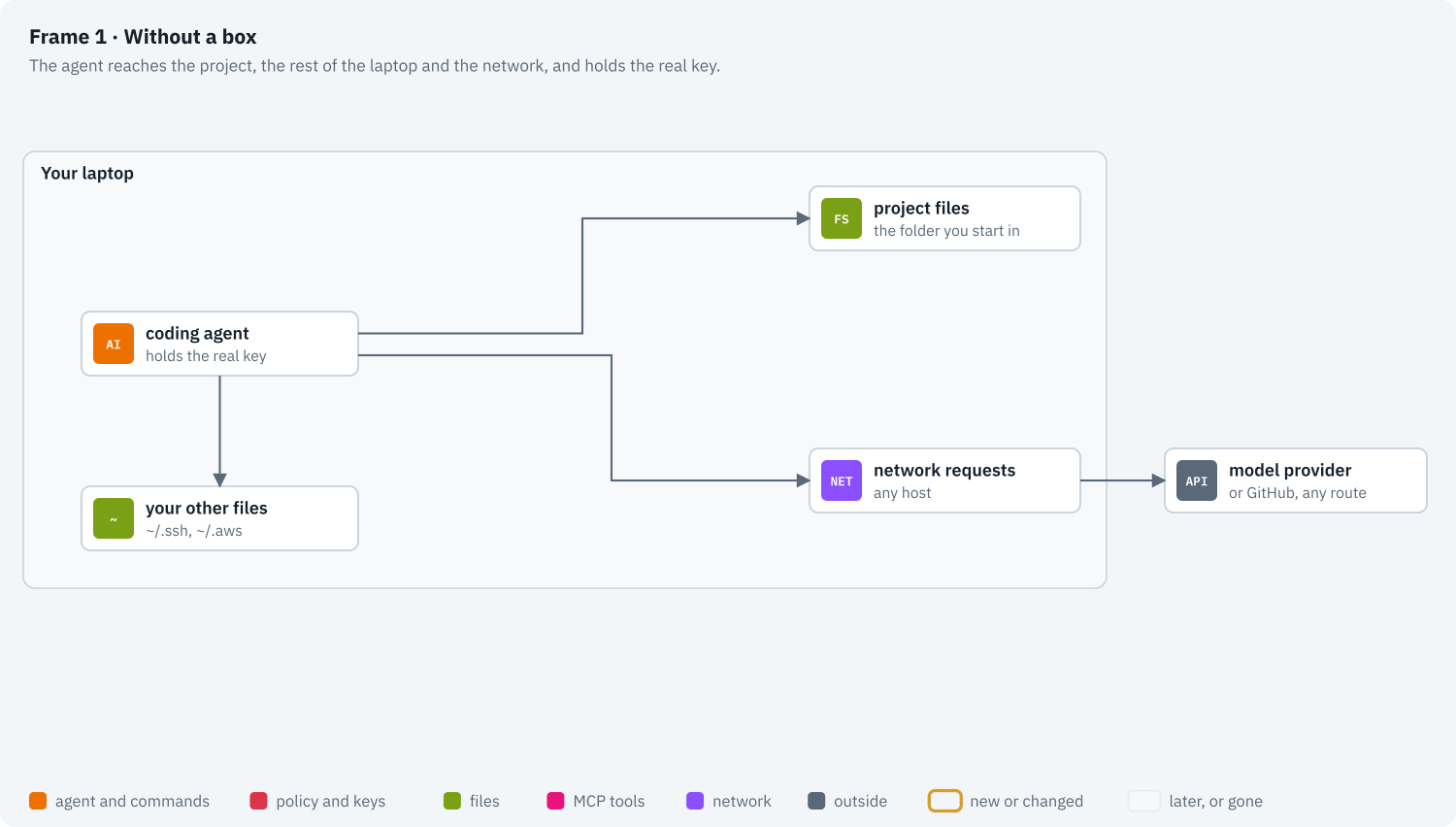
Look at the agent's subtitle: it holds the real key, and nothing sits between it and the network.
On a typical laptop, a coding agent like Claude Code or Codex runs as you. It can read the project folder, .env included. It can often read the rest of your home folder too, such as ~/.aws and ~/.ssh, unless you said no to that in its settings. It calls the model with a real API key from an environment variable or a file. And when it runs a shell command, that command can reach any host.
Each agent has its own permission prompts, and they help. But they live inside the agent, and plenty of people run with them off. Box's own README expects that: "with its permission prompts off if you like." A rule that the agent itself enforces is a rule the agent can be talked out of.
Watch the video: https://youtu.be/WwUOZCf_5yE
What the box is
Strands Box is open source (Apache 2.0) from Strands Agents, the AWS open-source agent project. It's written in Rust. The box command is in preview: the repository was created on 2 October 2026, and v0.3.0 was tagged on 23 November 2026. It runs on Apple silicon Macs with macOS 15 or later, and on Linux on ARM64 and x86-64.
You start an agent the way Box's own README shows:
cd ~/src/my-app
box run claude
It supports four agents today: Claude Code, Codex, Kiro CLI and pi. Under box is Box Core, an engine you can also run on a cloud host. This series stays on the laptop.
Two ideas carry it.
Idea one: rules the agent can't change
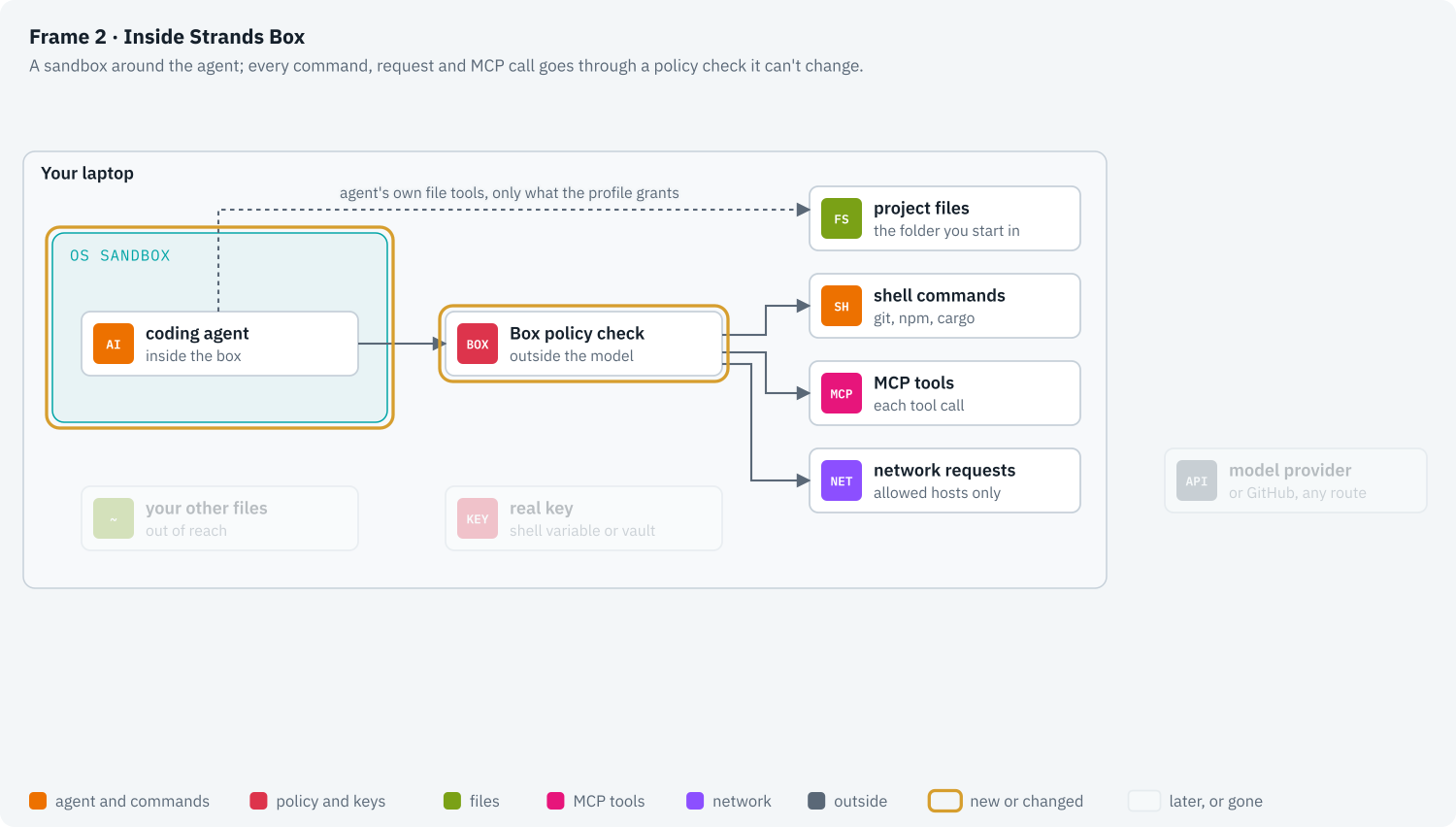
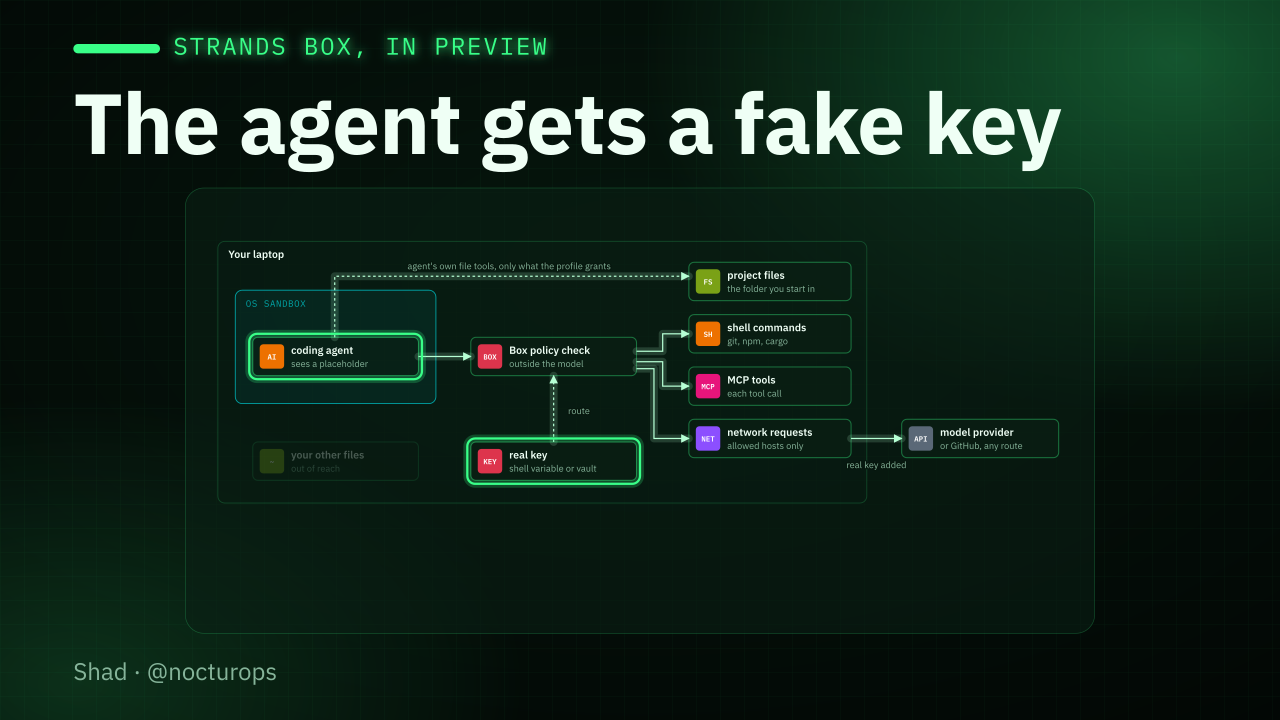
The gold ring is new: a sandbox around the agent, and a policy check between it and everything else.
The agent runs inside an operating-system sandbox. Its own file tools, the ones that read and edit files, reach only the files and folders the profile grants. A profile is Box's word for one agent's setup: which agent, which model provider, which tools, and which policy.
Everything else goes through a policy check before it happens: each shell command and the files it touches, each network request, and each MCP tool call. The policy is written in a language called Dogwood, or picked from a starter, such as Scoped or Locked, which reach only the hosts your profile allows.
The part I care about most: the check runs outside the model. In the project's words, "nothing the agent reads can change the answer", and the agent can't change its own policy. So a prompt injection hidden in a dependency's README can make the agent want to send your files somewhere. It can't make the box allow it.
A rule can also count. The docs give the example of a limit of 60 calls to a server in an hour. When a rule says no, Box tells the agent the rule's reason, so it can stop or ask instead of retrying. And box runs history lists every decision afterwards.
Idea two: the agent never holds the key
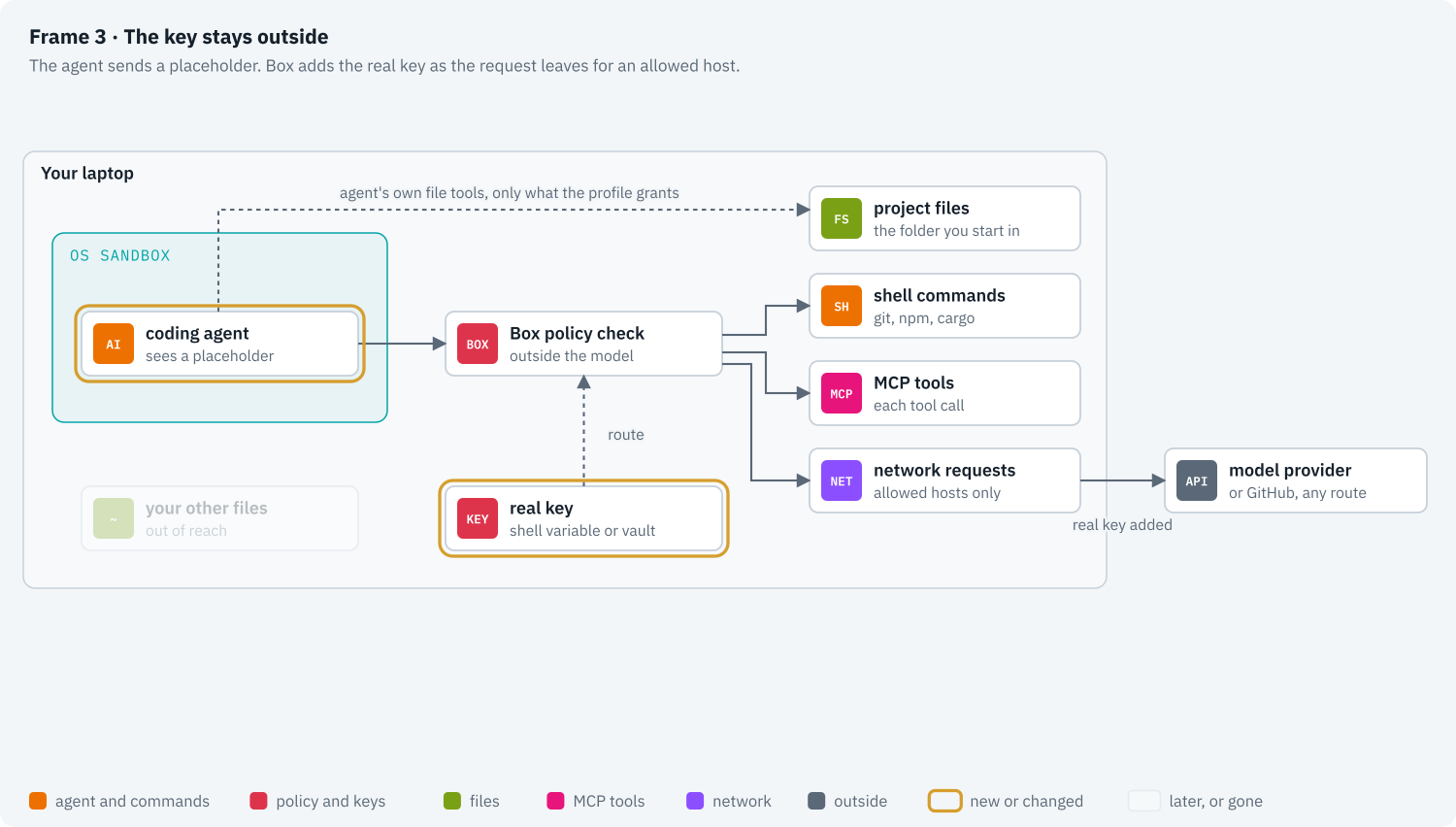
Follow the dashed line from the real key: it meets the request at the edge, after the agent has let go of it.
This is the idea that fits our incident.
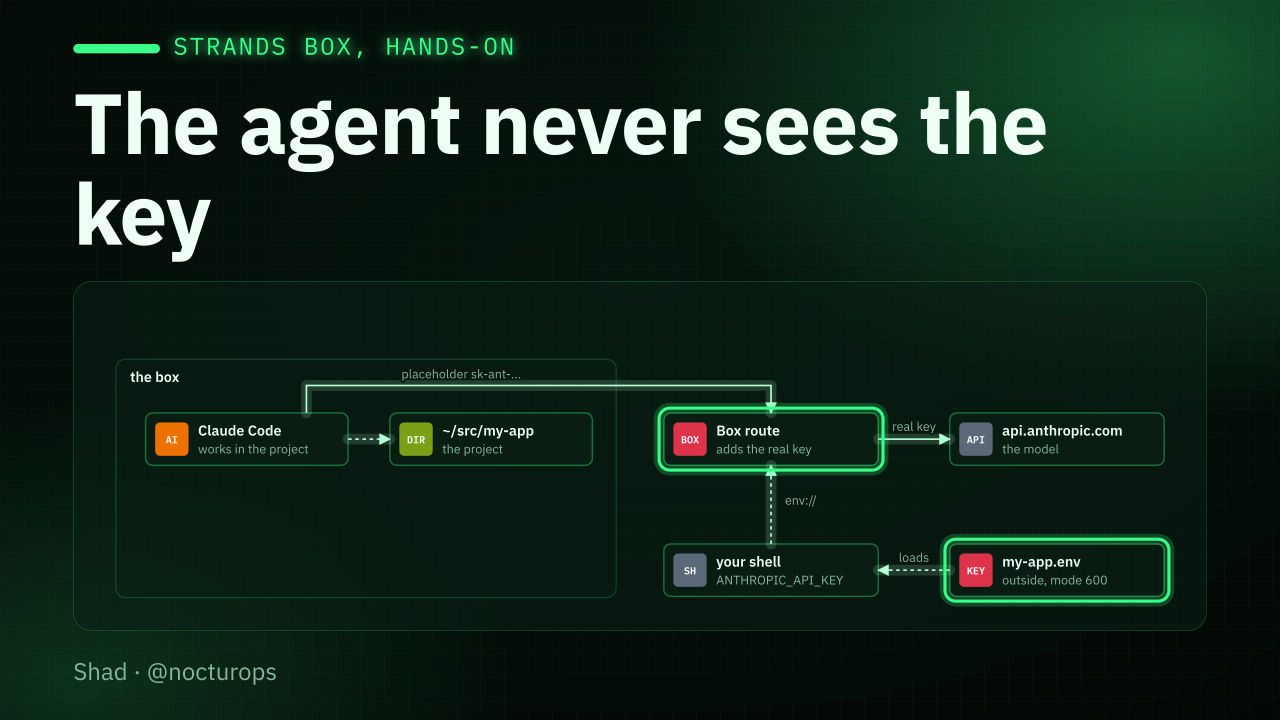
Box keeps keys outside the box. A host that needs a key is reached through a route: a small table in the profile that names the hosts and where the key comes from, such as a variable in your shell or your password manager. Inside the box, the agent sees a placeholder. Box puts the real key in as the request leaves for one of the route's hosts.
So if the agent prints its environment, it prints a placeholder. If something tricks it into sending "its key" to a stranger, it sends a placeholder, and the stranger's host isn't on the route anyway.
Would this have stopped our $8,000 bill? I can't say, and I won't pretend to. We never found how that key leaked, and the key that was abused wasn't the one we found in the repository. What Box changes is narrower, and it's still a lot: a coding agent in a box can't hand over a key it never had.
The gap its own docs point at
The project has a page called "What a box does not protect". Read it before you trust a run. Here's the line that matters most for this series:
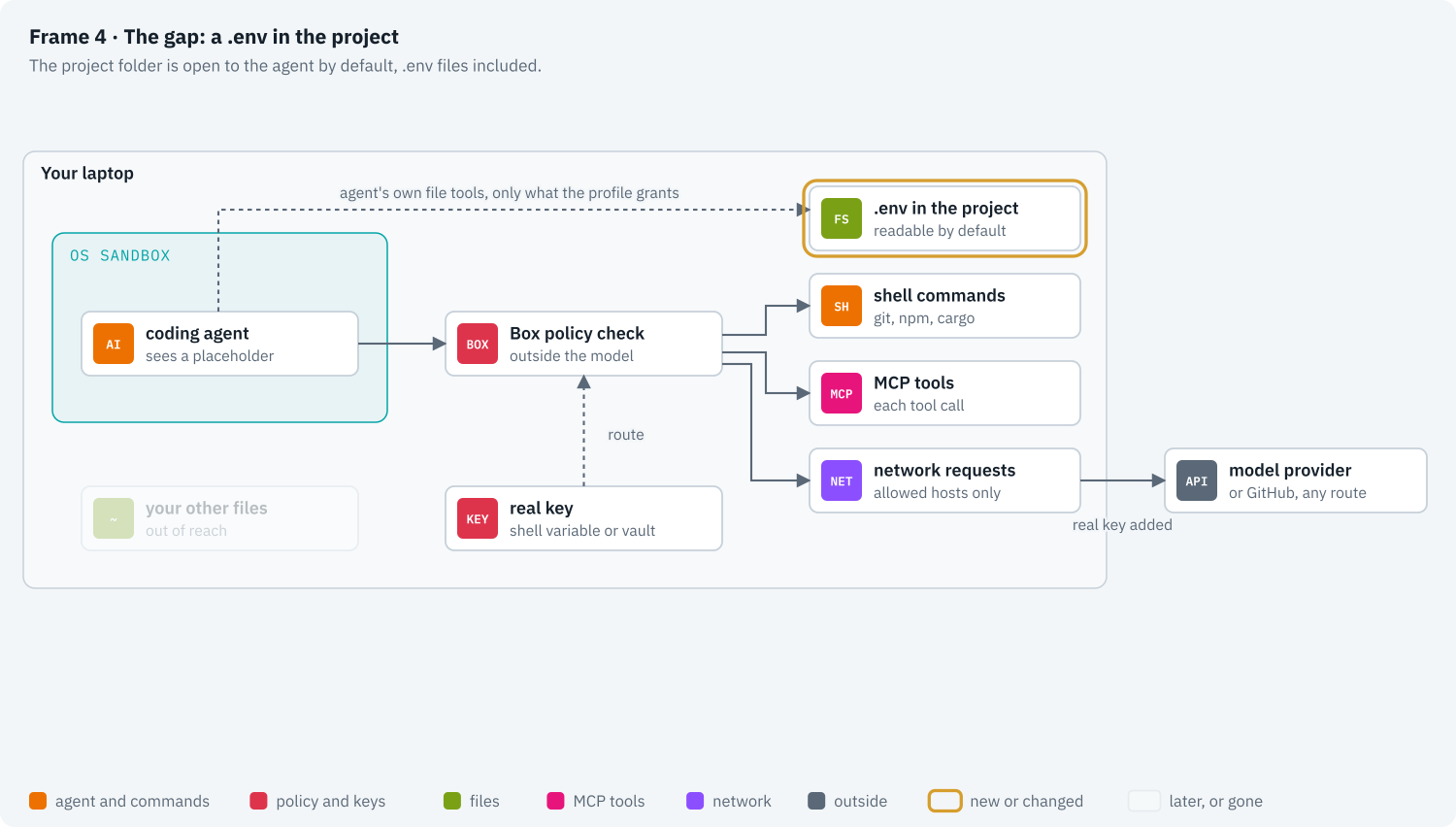
The ring is on the project folder. The box is doing its job, and the .env is still in reach.
The project folder is open to the agent by default, keys and .env files included. The box limits the agent to the project. If your key is in the project, it's in reach.
A few more from that page, in plain words:
- File rules decide only the box's shell. A policy rule like "never read
.env" stops the box's shell and Python. The agent's own file tools still reach every file the profile grants. - The agent can plant code that runs later, outside the box. A git hook,
.claude/settings.json, apackage.jsonscript or an.envrcit writes will run the next time you usegit,npmordirenvon that project. The docs give a check to run after each run, starting with.git/configand the hooks. - One profile is shared by all projects. Something the agent writes into the shared settings in one project shows up in the next. Use a separate profile for untrusted repositories and for sensitive work.
- Run records are a plain file, not a tamper-proof audit log.
None of this is a reason to skip Box. It's the list of what you still own.
So, the .env
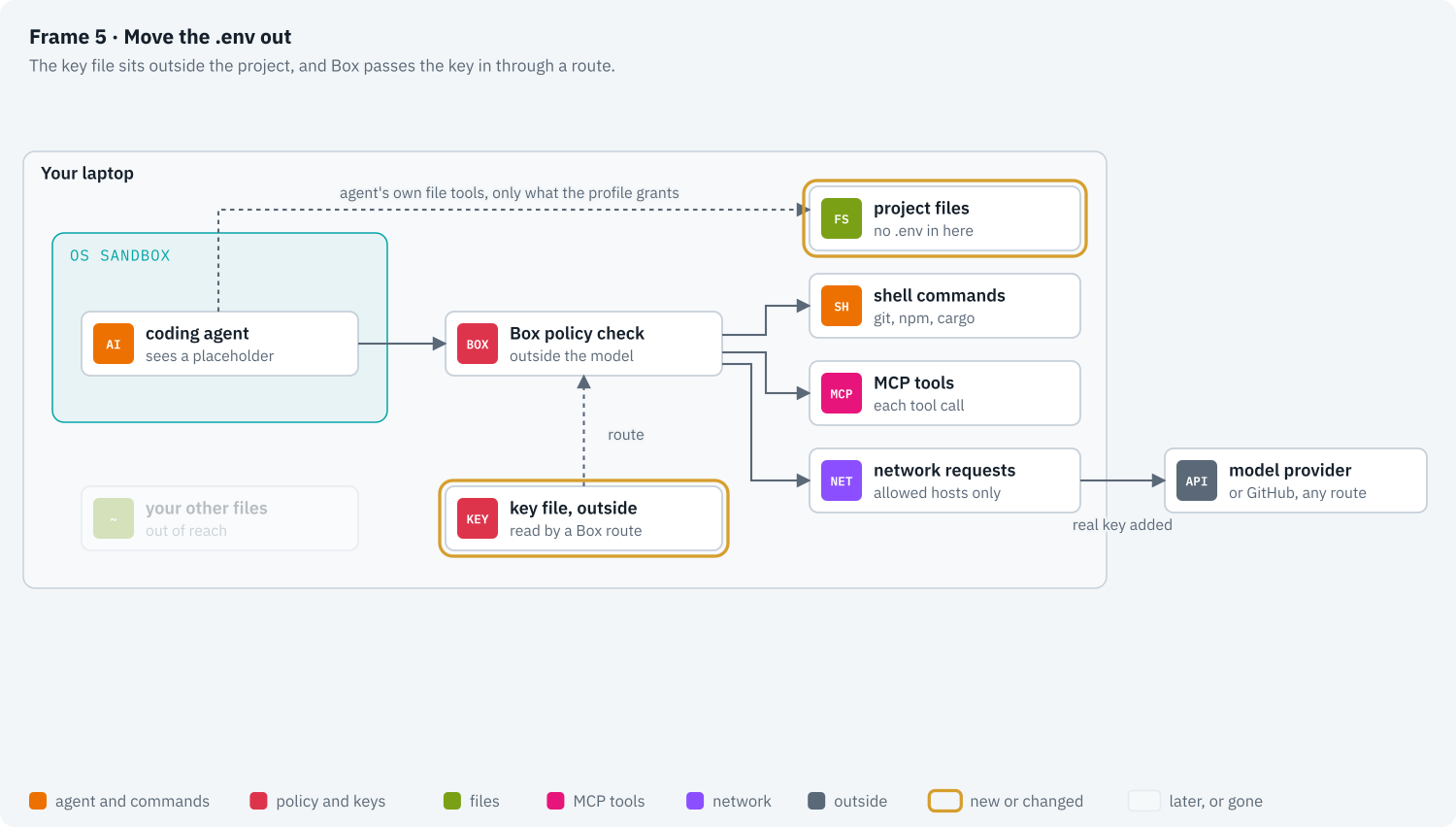
Two rings: the project with no .env in it, and the key file outside it, read by a route.
When I first read about Box, I thought it solved the local .env problem. It narrows it. The fix is simple:
Keep the .env out of the project and let Box add the key on the way out. Then the agent never holds the real key. That closes the agent's path to it, not every path on the laptop.
Another program on the laptop, a stolen laptop, or a key pasted into a chat window are all still possible. That's why the rest of the plan stays.
Box against the plan
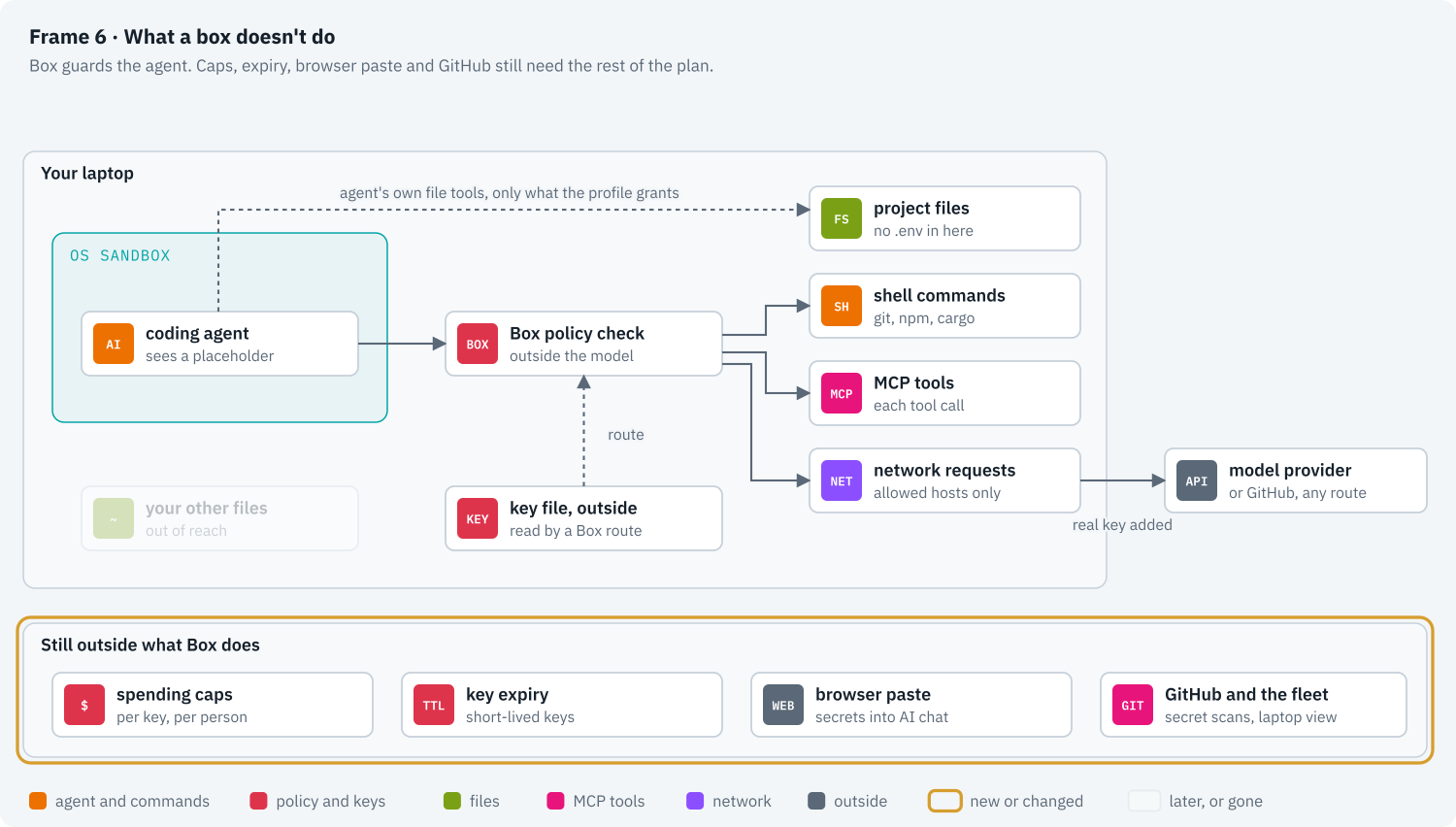
The bottom row is everything the box doesn't reach. Each one is a part of Part 2's plan.
My eleven-part plan from Part 2, part by part:
| Part of the plan | Does Box cover it? | Why |
|---|---|---|
| An AI gateway with personal, capped keys that expire within 2, 4 or 8 hours | No | Box adds a key; it doesn't cap spending or expire keys |
| A zero-trust layer that blocks direct calls to AI providers | On the laptop, for the agent | Scoped and Locked policies reach only allowed hosts, but only inside the box |
A small CLI: short-lived AWS sign-in, secrets at run time, no .env |
Partly | Routes pass secrets in at run time; the sign-in is still yours to set up |
| A laptop checker for AI tools, agent settings, secret files and canary keys | No | Box guards one run, it doesn't report on the laptop |
| Desktop AI app checks | No | Box runs terminal agents |
| A browser extension against pasted secrets | No | Nothing a browser does goes through the box |
| A control plane and dashboard | No | Run history is per machine |
| Automated key rotation | No | A route reads the key; it doesn't rotate it |
| Device management that pushes safe settings | No | Box has starters that give a team one standard setup, but something still has to install them |
| GitHub guardrails | No | Commits and repository settings are outside the run |
| Full traffic inspection, later | No | Box sees the agent's requests, not the laptop's |
Box covers one thing in that table well, and it's the thing my plan only watched from the side: what the agent itself can do while it works. Keeping the agent inside rules it can't change, and away from files it has no reason to read, is the new step. The CLI, the laptop checker, the desktop checks and the browser extension are still needed.
What I'd choose, and the trade
| Option | Why not, on its own | When I'd switch |
|---|---|---|
| The plan without Box | The agent still runs with everything the laptop can reach | Never, now that Box exists |
| Box without the plan | No spending cap, no expiry, no view across laptops, nothing for the browser | If Box or the gateway learns to cap spend per key |
| Box for every agent run, and the plan around it | It's more to set up: a profile per agent, a route per key, a check after each run | This is the one I'd pick |
The price is setup and habit. Every engineer needs a profile, every key needs a route, and someone has to read .git/config after a run before trusting the work. It's less work than a credentials manager for every laptop, and more than having no limits at all, which is how one leaked key reached about $8,000.
What I'd tell an engineer on the team
Move your .env out of the project today. Keep the key in a separate file only you can read, or your password manager, and let Box pass it in. Then run every agent through box run, never straight from the terminal. And put a spending cap on every key you hold, because one day one of them will leak.
When I'd change my mind
When Box leaves preview, I'd make it the default for every agent run, not just the sensitive ones. And when Box or the gateway can cap spend per key, the line between "the box" and "the plan" moves, and I'd redraw this table.
Three questions to try
- An engineer runs Claude Code in a box with the Scoped policy. Their
.envis in the project root. A dependency's README tells the agent to print every environment file. What gets printed? - You add a policy rule that forbids reading
.env. Is the file safe now? - The agent finishes and you run
git statusin the project. What could already have run, and what should you have checked first?
Answers
- The
.envfile's contents, keys and all. The project folder is open to the agent by default, so its file tools can read it. The model key from a Box route stays a placeholder, but anything written in that.envis in reach. Move the file out of the project. - Only from the box's shell and Python. File rules in the policy don't decide the agent's own file tools, so the agent can still read it. The docs explain how to keep a folder away from every process; the simplest fix is still to keep the file out of the project.
- A
core.fsmonitorsetting in.git/config, which evengit statusruns, and any git hook the agent added. Before anygitcommand, read.git/configand list.git/hooks, as the project's limitations page says.
Try it with no model
The series repo has a probe for this part: a plain shell runs in a box in place of a coding agent, so it needs no model and costs nothing. On a Linux laptop it saw a placeholder in place of the key, read a .env left in the project, and read nothing once the profile's deny went in. The steps: github.com/shadreza/keep-the-key-out-of-the-agent.
Next
In Part 4, I run Claude Code in a box on a real machine: the key outside, a request denied on purpose, and the .env gap shown live. Part 4.
Sources
- AWS Developers video, "Sandbox Your AI Agents in One Command with Strands Box": https://www.youtube.com/watch?v=Z18kFF3uhSA
- Strands Box: https://strandsagents.com/box/
- The repository: https://github.com/strands-agents/box
- How Box works: https://github.com/strands-agents/box/blob/main/docs/cli/how-box-works.md
- What a box does not protect: https://github.com/strands-agents/box/blob/main/docs/cli/limitations.md
- Dogwood, the policy language: https://github.com/dogwood-policy/dogwood
Comments
Join the discussionNo comments yet. Be the first to comment.