Part 1 of 4 in Keep the key out of the agent.
A leaked AI key ran up about $8,000 on a project's bill. We still don't know how it leaked.
That second sentence is the uncomfortable one. Most incident write-ups end with a root cause and a fix. This one has a fix, and the fix doesn't depend on the root cause. I want to walk through why, because the same setup is on a lot of laptops right now, probably including yours.
Watch the video: https://youtu.be/W9Cp6FCg_7I
The day the bill looked wrong
On 18 October 2026 we were working on the project as usual. Then the project's owner got in touch about the AI bill. The usage on it was abnormal.
By the time we heard, the providers had already disabled the keys. We rotated them anyway, so nothing would ever run on the old ones again.
Then we looked at what had happened.
What the logs showed
The OpenAI logs told the story. Someone had got hold of an OpenAI key and used it on OpenAI's largest model. That is where the money went.
The numbers:
| What | Amount |
|---|---|
| Total on the bill | about $8,000 |
| Anthropic's part | about $250 to $300 |
| OpenAI's part | the rest |
| Spending limit on the keys | none set |
The last row is the one I keep coming back to. Nothing on the keys said "stop at this amount". So the only limit was how fast someone else could spend.
What it cost, in the end
The providers refunded it in full, after 2 to 3 weeks of discussion.
That's a good outcome, and I don't want to undersell it. But a refund isn't a control. It depends on the provider agreeing, and on weeks of discussion. And a key that reaches data, not only a model, can't be refunded at all.
What we don't know
We never found how the key leaked. There was no trace to follow.
What we did find made it harder, not easier:
- The key that was abused was not the key we found in the repository. So "someone pushed a key to Git" isn't the answer, even though someone had.
- An Anthropic key had been in the Git history of the private repository. It was removed from the code later. It stayed in the history.
- Keys lived in
.envfiles on laptops. - Engineers used coding agents on those laptops, in those project folders.
None of these is proven to be the path. Each one is a place a key can leak from. I'll say that plainly, because it would be easy to write this up with a villain, and it wouldn't be true.
Where a key sits on a laptop that runs a coding agent
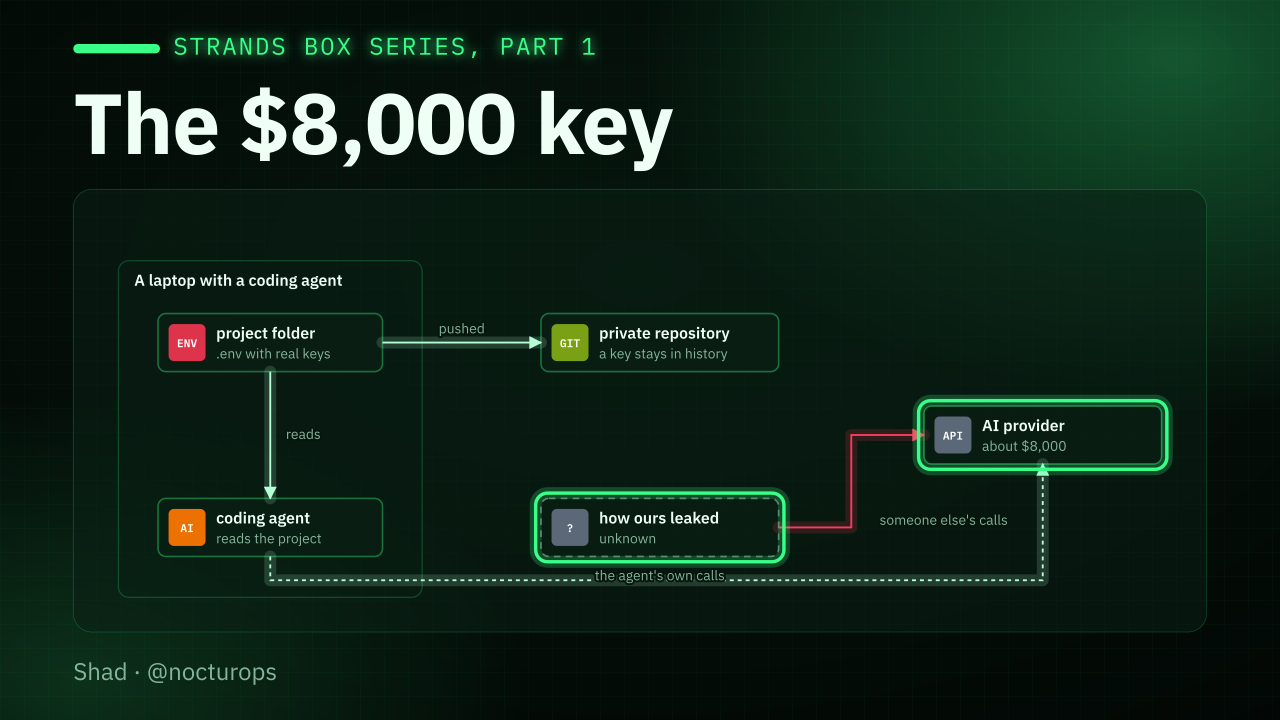
The diagram below isn't a reconstruction of our leak. It's a map of where a key can sit when you work the way most of us work today.
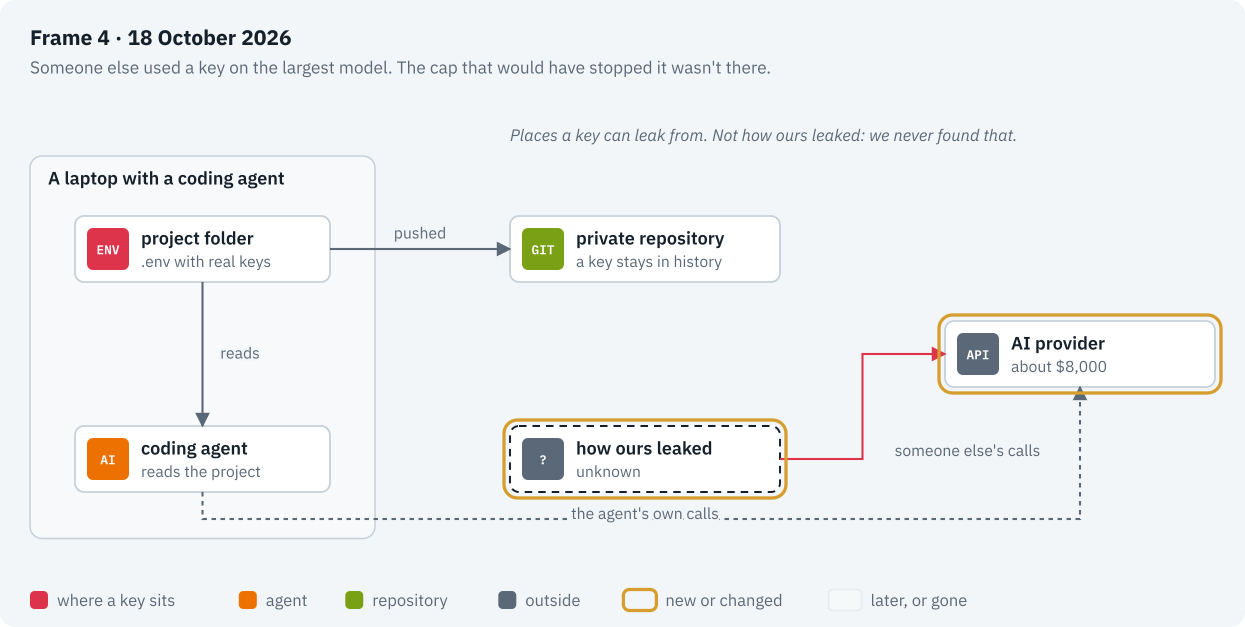
Look at the dashed card: how ours leaked is still unknown. Everything else on the picture is a place a key can sit.
Walk through it card by card.
Start with the project folder. A .env file (a plain text file of settings, often with real keys in it) sits in the project, because that's where the framework reads it from. It's convenient, and every tutorial does it.
Then the coding agent. It works in that same folder. A coding agent is a program that reads your files, runs commands and calls a model to decide what to do next. Whatever it can read, it can put into a prompt, a log or a command. It doesn't need bad intent for that. It needs one instruction it shouldn't have followed, or one file it shouldn't have opened.
Then the repository. Somebody commits the .env once, by mistake. It gets removed in the next commit. It's still in the history, and every clone of the repository carries it.
And at the end of every path is an API that will serve anyone holding the key, as fast as they can send requests, until something tells it to stop.
On our project, nothing told it to stop.
The lesson I took from it
How the key leaked decided whether we had an incident. What the key was allowed to do once it was out decided how big the incident was.
We can't always close every path. We didn't even find ours. But we can make sure that a key, once out, can only do a small amount of damage. And we can keep the real key out of the places where it's easiest to lose: the project folder, the agent's view and the Git history.
Those are the two fixes the rest of this series is about:
- Keep the real key out of reach. If the laptop and the agent never hold it, they can't leak it.
- Put a limit on every key that remains: a spending cap, a short life, one owner.
The first one is harder, and it's where Parts 2 to 4 spend most of their time. The second one we could have had on day one. On our project it wasn't set.
What I'd do differently
| Option | Why it wasn't enough on its own | When it would be |
|---|---|---|
| Rotate the keys and move on | The path stayed unknown, so the next key could leak the same way | Only if we had found and closed the path |
| Scrub the key from Git history | Necessary, but the abused key wasn't the one in the repository | When the leak is traced to the repository |
| Trust the provider to catch abuse | They did disable the keys, but after the money was spent | Never as the only control |
| A spending cap on every key | Doesn't stop a leak, only limits it | Always. This is the one I'd set first |
If I could go back to the start of the project, I'd set the cap before the first line of code. Of everything on this list, it's the one that would have put a ceiling on the number.
Three questions to test yourself
- Your team finds a key in Git history and removes it with a new commit. Is the key safe now?
- A provider disables a key for abuse and refunds the bill. What's the one thing you still have to do the same day?
- You can't trace how a key leaked. What can you still change so the next leak costs less?
Answers
- No. The key is still in every earlier commit and in every clone. Treat it as leaked: rotate it, then clean the history if you need to.
- Replace the key and make sure nothing still uses the old one, then set a spending cap on the new one. A refund doesn't change the setup that let it happen.
- What any key can do: a spending cap, a short life and one owner. And where the real key lives: out of the project folder and out of the agent's reach.
Want to see which keys your own coding agent can reach? The series repo has a script for it, and the code for every part: github.com/shadreza/keep-the-key-out-of-the-agent.
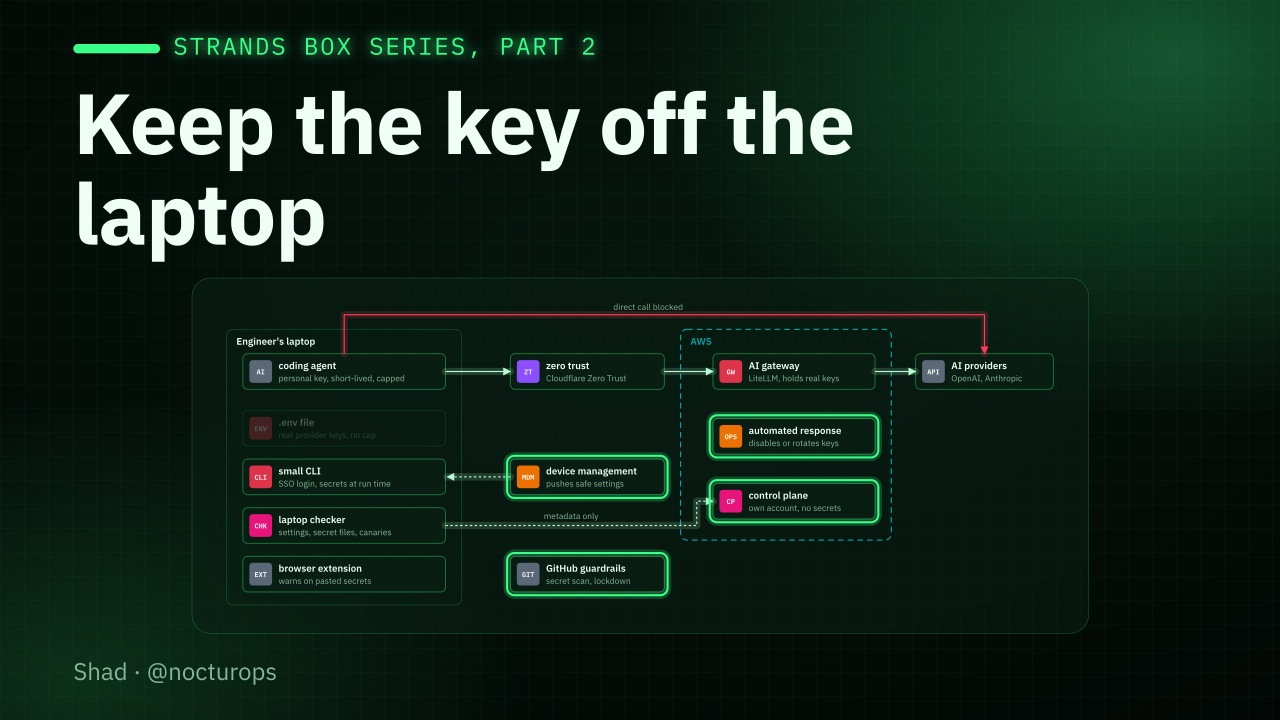
Next, in Part 2: the plan I wrote after this, built on one line. Real keys never sit on a laptop. (https://devops-stories.hashnode.dev/keep-the-real-key-off-the-laptop)
Comments
Join the discussionThe line I'd keep is that the fix doesn't depend on the root cause. On a job you don't wait to learn who left the gate open before you put a lock on the tool trailer. A spending cap is that lock. It doesn't tell you who or how, it puts a ceiling on the damage. I also appreciate that you didn't write in a villain. Saying "we don't know" and listing every place a key can sit is more useful than a tidy story. Coming from estimating, the line item with no limit on it is the one that sinks the job.
Thanks, the tool trailer comparison fits. The keys were created and managed by the project owners outside our setup, so I'd never had a reason to check whether they were capped. After the incident it was clear this needed proper consulting work and not a one-time fix: ownership, where keys live, and a ceiling on each one. "The line item with no limit" is the one I'll remember.
Since the leak path was never found, did you rotate every key that sat in a .env on the laptops where agents ran, or only the ones that got abused?
Due to misuse, AI providers automatically suspend the keys. Therefore, we have considered new API keys for the project's functionality.
What about unused keys that were also sitting in those .env files? Were those rotated too, or are they still the old ones?